Lesson 2. MVCC and Dead Tuples
Mission link: Stage 2 opens vacuum and bloat: before diagnosing either, this lesson is why Postgres accumulates dead rows at all, a direct consequence of how it lets readers and writers work without blocking each other.
Primary source: Docs: "Routine Vacuuming", PostgreSQL
Prerequisites: Lesson 1, Write-ahead log (WAL)
Warm-up
- ▢ Why must a transaction's WAL record be durable on disk before that transaction is reported as committed?
Check
Because the data pages the transaction changed may not be flushed to disk yet; the WAL record is the only durable evidence of the change, so without it being safely written first, a crash right after "commit" would silently lose that transaction.
- ▢ What does a Postgres standby actually receive from the primary during streaming replication?
Check
The WAL records the primary generates, which the standby replays the same way crash recovery replays them locally, not a copy of the data files or a re-run of the original SQL statements.
Know this
MVCC: never modify a row in place
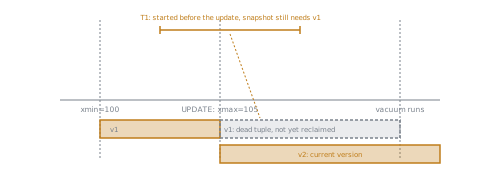
Postgres uses multi-version concurrency control (MVCC). An UPDATE doesn't overwrite a row's storage in place: it writes an entirely new row version and marks the old version as superseded. A DELETE doesn't immediately erase a row either; it marks the existing version as expired. Every row version carries transaction ID metadata, xmin (the transaction that created it) and xmax (the transaction that expired it, if any), which determines which transactions are allowed to see it.
Why this lets readers and writers avoid blocking each other
Because an old row version isn't destroyed the instant it's superseded, a transaction that started before an update can keep reading the version it's entitled to see, while a concurrent transaction performing that update writes a new version nobody else sees until it commits. Readers don't block writers, and writers don't block readers, precisely because both versions coexist in storage for as long as some active transaction might still need the older one. That coexistence is the whole benefit of MVCC, and it's also exactly where dead tuples come from.
Why dead tuples accumulate
Once every transaction that could possibly still need an old row version has finished, that version becomes a dead tuple: fully superseded, invisible to every current and future transaction, and pure wasted space. Postgres does not reclaim that space the instant a tuple becomes dead; it just sits in the table's storage, taking up room, until something comes along to clean it up. This means every ordinary UPDATE and DELETE leaves dead tuples behind as a direct, unavoidable consequence of MVCC, not a bug or a sign anything went wrong; a table under heavy update or delete traffic accumulates them constantly, and nothing about normal operation removes them on its own.
What vacuum actually does
Vacuum scans a table's pages, identifies dead tuples, and marks their space reusable for future inserts and updates within that same table. Ordinary VACUUM does not shrink the table or return space to the operating system; it only makes existing space available for reuse internally. VACUUM FULL does compact the table and return space to the OS, at the cost of taking an exclusive lock on the table for the duration, which ordinary VACUUM never does. Vacuum also updates the visibility map (letting future vacuum scans skip pages already known to hold no dead tuples) and prevents transaction ID wraparound by freezing very old tuples, a related but distinct failure mode that's part of why vacuuming isn't something a busy table can simply skip. Autovacuum is the background process that runs ordinary vacuum automatically, triggered by thresholds like the fraction of a table's rows updated or deleted since its last vacuum, rather than requiring a human to run it by hand.
Practice
- ▢ A row is updated by a transaction. Does Postgres modify that row's existing storage in place? Describe what actually happens to the old version.
Check
No. Postgres writes an entirely new row version reflecting the update and marks the old version as superseded (setting its xmax to the updating transaction). The old version isn't deleted immediately; it remains in storage as long as any active transaction might still be entitled to see it.
- ▢ Why does MVCC let a reader avoid blocking a concurrent writer, and a writer avoid blocking a concurrent reader?
Check
Because old and new row versions coexist in storage, a reader that started before an update keeps seeing the version its transaction is entitled to (based on xmin/xmax visibility), while a concurrent writer creates a new version without needing to wait for or disturb what the reader is looking at. Neither has to block the other since both versions are simply present at once.
- ▢ Why does a table under heavy
UPDATEandDELETEtraffic accumulate dead tuples, and why doesn't this resolve on its own without vacuum?
Hint
Consider what Postgres does the instant a row version becomes dead versus what actually reclaims its space.
Check
Every UPDATE and DELETE leaves the old row version in place until no transaction could possibly still need to see it, and even then, Postgres doesn't proactively reclaim that space the moment it becomes dead. The space just sits there, marked dead, until vacuum scans the table and marks it reusable; nothing in ordinary read/write operation does that cleanup itself.
- ▢ Contrast what ordinary
VACUUMdoes to a table's space with whatVACUUM FULLdoes, and name the costVACUUM FULLincurs in exchange.
Check
Ordinary VACUUM marks dead tuples' space reusable within the table, but doesn't shrink the table on disk or return space to the operating system. VACUUM FULL compacts the table and does return space to the OS, but it requires an exclusive lock on the table for its duration, blocking normal access, which ordinary VACUUM never does.
-
▢ Which claim is true of why Postgres accumulates dead tuples?
- a) Dead tuples only appear when something goes wrong, such as a failed transaction
- b) MVCC keeps old row versions around so concurrent readers and writers don't block each other, and dead tuples are the ordinary, unavoidable byproduct once those versions are no longer needed
- c) Ordinary
VACUUMreturns reclaimed space to the operating system, shrinking the table on disk - d) Autovacuum requires a human to manually trigger each run based on a schedule
Check
b) That's the direct MVCC trade-off this lesson describes. (a) is false: dead tuples are a normal consequence of ordinary updates and deletes, not a sign of failure. (c) is false: that describes VACUUM FULL, not ordinary VACUUM. (d) is false: autovacuum runs automatically based on thresholds, not a human-triggered schedule.
Real-world reps
- [ ] On a Postgres instance you can access, run a query against
pg_stat_user_tablesand note then_dead_tupcount for a table with regular update or delete activity. - [ ] Find that same table's
last_autovacuumtimestamp and compare how recently autovacuum actually ran against how much dead-tuple activity has accumulated since. - [ ] Tomorrow: read the primary source's section on how autovacuum decides when to trigger, and write down which threshold setting would change how often it runs on a table you looked at.
Going further
Not landing? Reread the primary source at the top, since this lesson compresses it and compression is where understanding leaks. Check the glossary for any term that felt slippery.
If the lesson itself is unclear rather than the material, that is a defect: open an issue.