Lesson 9. What a Managed Service Shields You From
Mission link: Stage 5 opens the final question the mission asks: does using a managed service change what this workspace has taught, or only who performs it and how you interact with it?
Primary source: Docs: "PostgreSQL on Amazon RDS", AWS
Prerequisites: Lesson 8, Write-ahead log (WAL)
Warm-up
- ▢ Why can an HNSW index be substantially larger on disk than the raw vector data it indexes?
Check
HNSW stores a graph structure connecting vectors to their neighbors across multiple layers, not just the vectors themselves; that connectivity overhead can exceed the raw vector data's own size, unlike a typical B-tree index relative to its table.
- ▢ What does synchronous replication bound, and what does it cost in exchange?
Check
It bounds data loss on failover to zero for genuinely committed transactions, by making the primary wait for a standby to confirm receiving the WAL before reporting commit success. The cost is added commit latency and reduced availability if that standby becomes unreachable.
Know this
What managed automation actually removes
A managed service (RDS-style) automates several operational tasks a self-hosted operator would otherwise build and run themselves: patching and minor version upgrades on a maintenance window instead of manual updates and restarts; automated backups paired with point-in-time recovery, rather than an operator building and maintaining their own WAL-archiving pipeline; and failover detection and promotion, automatically handling exactly the gap lesson 5 named, that Postgres itself doesn't include automatic failure detection and promotion out of the box. A managed service is, in effect, one of the external failover tools lesson 5 mentioned, bundled into the platform.
What it does not remove: the underlying mechanics still exist
None of this changes whether the mechanisms this workspace covered are still happening. A managed instance's tables still accumulate dead tuples exactly the way lesson 2 described; autovacuum still needs monitoring and tuning per workload, and diagnosing bloat still means checking the same signals lesson 3 covered, n_dead_tup, last_autovacuum, whether something is holding back reclamation, just surfaced through whatever monitoring dashboard the managed service exposes rather than direct filesystem access. A managed read replica still has receive lag and replay lag exactly as lesson 6 described, and diagnosing why it's lagging still requires the same distinction between a receive problem and an apply problem. Every index still costs what lesson 7 and lesson 8 said it costs on writes, whether it's a click in a console or a manual CREATE INDEX command that triggers it.
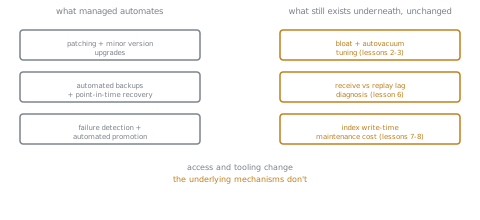
What genuinely changes: access, not physics
A managed service typically restricts or removes direct filesystem and superuser access, which changes how an operator diagnoses and fixes things, not whether the underlying issue exists. Some operations that assume OS-level access, like running certain maintenance directly against the filesystem, may not be available the same way. Extension availability also varies by provider: pgvector specifically is supported by most major managed offerings, which matters directly given this domain's connection to llm/rag's choice of pgvector as its store, but it isn't guaranteed for every extension a self-hosted instance could install freely.
Failover automation doesn't erase the timeline and data-loss questions
An automated failover still takes measurable time, and it still can lose data that hadn't been replicated if synchronous replication wasn't configured, since many managed defaults use asynchronous replication unless explicitly changed. The same split-brain and timeline concerns from lesson 5 still exist underneath an automated failover; the RPO (how much committed-but-unreplicated data is acceptable to lose) and RTO (how long recovery is acceptable to take) trade-off doesn't disappear just because a managed service handles the mechanics, it's simply decided by that service's defaults unless an operator explicitly overrides them.
Practice
- ▢ Name three operational tasks a managed service like RDS typically automates that a self-hosted operator would otherwise have to build and run themselves.
Check
Patching and minor version upgrades on a maintenance window, automated backups with point-in-time recovery, and failure detection paired with automated standby promotion (failover).
- ▢ Does using a managed service remove the need to understand vacuum and diagnose bloat? Why or why not, and what specifically changes versus stays the same?
Check
No. Tables on a managed instance still accumulate dead tuples exactly as lesson 2 described, and autovacuum still needs monitoring and tuning for the workload. What changes is access: bloat gets diagnosed through whatever monitoring interface the managed service exposes rather than direct filesystem or pg_stat_user_tables queries run with full access, but the underlying mechanism and the need to understand it are unchanged.
- ▢ A team assumes failover on their managed service is "instant and lossless" because it's automated. What's wrong with that assumption, and what specifically from lesson 5 still applies?
Hint
Consider what replication mode the managed service's default actually uses.
Check
Automated failover still takes measurable time and can still lose committed-but-unreplicated data if synchronous replication wasn't configured, since many managed defaults use asynchronous replication unless explicitly changed. Lesson 5's async-versus-sync data-loss trade-off, and the RPO/RTO decision it forces, still applies; a managed service just makes that decision by default rather than removing it.
- ▢ Why is pgvector's availability on major managed services specifically worth checking, given this workspace's connection to
llm/rag?
Check
llm/rag standardizes on pgvector as its vector store, so whether a given managed Postgres offering supports installing that specific extension directly determines whether a RAG pipeline built on this workspace's stack can actually run on that managed service at all, unlike a more universally supported extension.
-
▢ Which claim is true of what a managed Postgres service changes?
- a) It removes the need to understand vacuum, replication lag, and index maintenance cost, since the provider handles all of it
- b) It automates specific operational tasks (patching, backups, failover) and changes an operator's access and tooling, without changing whether the underlying mechanisms (bloat, lag, index cost) still exist
- c) Every managed Postgres service supports every extension a self-hosted instance could install
- d) Automated failover on a managed service is always synchronous and lossless by default
Check
b) That's the core distinction this lesson draws: automation and access change, physics doesn't. (a) is false: the mechanisms this workspace covered still operate identically underneath. (c) is false: extension support varies by provider, which is exactly why pgvector's availability is worth checking specifically. (d) is false: many managed defaults are asynchronous, carrying the same data-loss risk on failover lesson 5 described.
Real-world reps
- [ ] For a managed Postgres service you use or are evaluating, find its documentation on how it exposes bloat and replication-lag monitoring, and compare it to the raw
pg_stat_user_tables/pg_stat_replicationqueries this workspace used directly. - [ ] Check whether that same service supports pgvector, and if so, what version and index types (IVFFlat, HNSW) it currently supports.
- [ ] Tomorrow: check what replication mode (synchronous or asynchronous) that service's default failover configuration actually uses, and whether that matches the data-loss tolerance your workload actually needs.
Going further
- Docs: "PostgreSQL on Amazon RDS", AWS
- Docs: "High Availability, Load Balancing, and Replication", PostgreSQL
- Resources
Not landing? Reread the primary source at the top, since this lesson compresses it and compression is where understanding leaks. Check the glossary for any term that felt slippery.
If the lesson itself is unclear rather than the material, that is a defect: open an issue.