Lesson 5. Counting Parameters and Bytes
Mission link: "Account for every byte" is in the mission. This is the lesson where you learn to do the arithmetic instead of guessing.
Primary source: Docs: Model memory anatomy, Hugging Face Transformers
Prerequisites: Lesson 2, Lesson 4
Warm-up
- ▢ What are the four operations in one training step?
Check
Forward pass (keeping activations), loss, backward pass (producing gradients), optimizer step.
- ▢ What does
-100mean in a labels tensor?
Check
Ignore this position when computing loss. It is how prompt tokens are masked out for completion-only loss.
- ▢ Which attention projections shrink under grouped-query attention?
Check
k_proj and v_proj. q_proj and o_proj keep the full hidden dimension.
Know this
A parameter is a number. Memory is that number's storage size times how many of them you have. Everything else in stage 2 is bookkeeping on top of this.
Numeric formats
| Format | Bytes | Notes |
|---|---|---|
float32 (fp32) | 4 | Full precision. The historical default for training. |
bfloat16 (bf16) | 2 | Same exponent range as fp32, fewer mantissa bits. The modern default. |
float16 (fp16) | 2 | More mantissa, much smaller range, so it overflows to infinity more easily. |
int8 | 1 | Integer, needs a scale factor to interpret. |
4-bit (nf4, int4) | 0.5 | Two values per byte, plus per-block scales. Stage 4. |
bf16 is preferred over fp16 for training despite storing less precision, because its exponent range matches fp32. Overflow is a harder failure to recover from than rounding error, and fp16 training historically needed loss scaling to avoid it.
The two numbers that describe a model
Say a model card claims 1.5B parameters. Then:
weights in fp32 = 1.5e9 × 4 bytes = 6.0 GB
weights in bf16 = 1.5e9 × 2 bytes = 3.0 GB
weights in nf4  = 1.5e9 × 0.5     = 0.75 GB, plus quantisation constants
This is inference-weight memory only: the floor for having the model in memory at all, before any activations, any KV cache, and certainly before training.
A useful reflex: bf16 gigabytes ≈ twice the parameter count in billions. A 7B model is about 14 GB of weights. A 70B model is about 140 GB. You should be able to produce these instantly.
Where the parameters are
From Lesson 2, per layer:
attention = 2 × d² + 2 × d × d_kv          (q, o full; k, v narrowed by GQA)
mlp       = 3 × d × d_ff                    (gate, up, down)
and across the model:
total ≈ n_layers × (attention + mlp) + vocab × d × (1 or 2)
The final term is doubled when the output projection is untied from the input embedding. For small models this term is not negligible: a 32k vocabulary with hidden size 2048 is 65M parameters per copy, which is a real fraction of a 1.5B model.
Worked example
A model with d = 2048, d_kv = 256, d_ff = 5632, 24 layers, 32k vocabulary, tied embeddings:
attention = 2 × 2048² + 2 × 2048 × 256  = 8.39M + 1.05M = 9.44M
mlp       = 3 × 2048 × 5632             = 34.6M
per layer                               = 44.0M
× 24 layers                             = 1.056B
embeddings = 32000 × 2048               = 0.066B
total                                   ≈ 1.12B
In bf16 that is about 2.2 GB of weights. Note that the MLP is 79% of the block; carry that forward to Lesson 10.
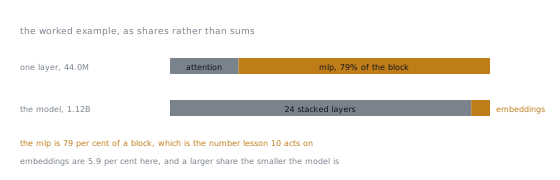
The same sums as shares, at the two levels that matter. Inside a block, attention is the smaller half by a wide margin, which is why the target-module question in Lesson 10 is mostly a question about the MLP. Across the model, the embedding term is small here and grows as a share as the model shrinks, which is the case the paragraph above is warning about.
What this does not yet include
You now have the weight cost. Training adds three more categories, and they dominate:
- Gradients, one per trainable parameter (Lesson 6)
- Optimizer state, two per trainable parameter (Lesson 6)
- Activations, dependent on batch size and sequence length rather than parameter count (Lesson 7)
Anyone who tells you a 7B model "needs 14 GB to fine-tune" has counted only the first category. That is the mistake this stage exists to eliminate.
Practice
- ▢ How many gigabytes are a 13B model's weights in bf16? In fp32? In 4-bit?
Check
bf16: 26 GB. fp32: 52 GB. 4-bit: about 6.5 GB, plus quantisation constants.
The doubling-and-halving chain from the parameter count is worth being able to do without a calculator.
- ▢ Why is bf16 preferred to fp16 for training, given fp16 stores more mantissa bits?
Check
bf16 keeps fp32's exponent range, so values do not overflow to infinity. fp16's narrow range means gradients can overflow or underflow, historically requiring loss scaling to work at all.
Rounding error degrades gracefully; overflow produces NaN and ends the run. The trade favours range.
- ▢ A model has
d = 4096,d_ff = 14336,d_kv = 1024, 32 layers. Compute per-layer parameters and the model total, ignoring embeddings.
Check
Attention: 2 × 4096² + 2 × 4096 × 1024 = 33.6M + 8.4M = 42.0M.
MLP: 3 × 4096 × 14336 = 176.2M.
Per layer: 218.2M. Times 32 layers ≈ 6.98B.
Roughly a 7B model, and the MLP is 81% of it.
- ▢ Two models both report 7B parameters. One has a 32k vocabulary, the other 256k. What differs, and by how much?
Check
The embedding cost. With hidden size 4096, a 32k vocabulary is 131M parameters per copy; a 256k vocabulary is 1.05B, around 15% of the whole model in one table, and double that if the output projection is untied.
The large-vocabulary model therefore has meaningfully fewer parameters in its transformer blocks, which is where adapters attach.
- ▢ Someone says a 7B model fits comfortably in 16 GB for fine-tuning, because bf16 weights are 14 GB. What is wrong with the reasoning?
Check
They have counted only the weights. Full fine-tuning also needs gradients and two optimizer moments per trainable parameter, plus activations, which is several times the weight cost. Even the 14 GB claim leaves only 2 GB for everything else.
The next lesson turns this into an exact number, and the answer is not close.
Real-world reps
- [ ] Pick three models of different sizes. From their config files alone (
hidden_size,intermediate_size,num_hidden_layers,num_key_value_heads,vocab_size), compute parameter counts and check them against the model cards. - [ ] Load one model in bf16 and measure actual memory used. Compare against your prediction and explain any gap.
- [ ] Tomorrow: do the bf16-gigabytes estimate for five model sizes in your head, then verify with a calculator.
Going further
- Docs: Model memory anatomy, Hugging Face Transformers
- Memory budget: the table this lesson builds toward
- Lesson 6. Gradients and Optimizer State
Not landing? Reread the primary source at the top, since this lesson compresses it and compression is where understanding leaks. Check the glossary for any term that felt slippery.
If the lesson itself is unclear rather than the material, that is a defect: open an issue.