Lesson 6. The Throughput/Latency Trade-off
Mission link: This is the stage 2 capstone: defending a batching configuration for a stated workload means putting a number on the throughput/latency trade-off lessons 4 and 5 described, against a latency budget and the capacity ceiling lesson 2 computed.
Primary source: Docs: vLLM Documentation, vLLM Project
Prerequisites: Lesson 5, Lesson 2, KV cache
Warm-up
- ▢ Why does batching more sequences' decode steps together increase throughput without a proportional increase in memory traffic?
Check
A decode step's memory traffic, reading the weights and the resident KV caches, barely changes whether it computes one sequence's next token or several. Batching spreads that same traffic across more useful compute.
- ▢ What is the capacity ceiling from lesson 2, in one sentence?
Check
(total memory − weights − overhead) / (bytes per token × context length): the maximum number of concurrent sequences the KV cache budget allows, independent of anything about latency.
Know this
Bigger batches do two things at once, and they pull in opposite directions
Adding another sequence to a batch increases throughput: more tokens get produced per second, aggregated across every sequence in the step. But every sequence in a batch step advances together (lesson 5), so stacking more sequences' decode work into one step also makes that step itself take longer. The delay between a single sequence's own successive tokens, its inter-token latency, grows with the batch it shares a step with. Throughput and per-token latency move together, not against each other independently: pushing one up pushes the other up too.
The curve has two regimes
At small batch sizes, decode is memory-bandwidth bound (lesson 4): the same weights and cache reads already dominate the step's cost, so adding another sequence is nearly free. Throughput rises roughly linearly with batch size while step latency barely moves. Past some batch size, there is enough stacked work that the GPU's raw compute, not its memory bandwidth, becomes the bottleneck: step latency starts climbing noticeably with every added sequence, and each further sequence buys less additional throughput than the last one did. That inflection is the same memory-bandwidth-bound-versus-compute-bound distinction lesson 3 drew between prefill and decode, now happening within decode itself as the batch grows.
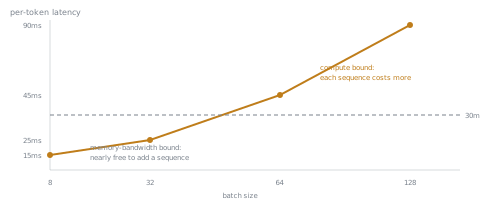
Defending a configuration means picking a point on that curve, not the largest number available
A stated workload gives two independent constraints, and the config worth defending is the largest batch size that satisfies both:
- A latency budget: a stated ceiling on inter-token latency (say, no output token should take longer than some number of milliseconds to arrive).
- The capacity ceiling: lesson 2's memory-derived maximum, which says nothing about latency and everything about whether the cache fits at all.
A batch size below both constraints leaves throughput on the table the budget could have afforded. A batch size above the latency budget trades a latency violation for throughput nobody asked for. The defended number is the smaller of what the budget allows and what capacity allows, and the reasoning for picking it is the answer to "why this number and not a different one," which is what defending a configuration actually means.
Practice
- ▢ A serving stack was benchmarked at four batch sizes: 8 (15 ms/token), 32 (25 ms/token), 64 (45 ms/token), 128 (90 ms/token). The stated latency budget is 30 ms/token. Which of these batch sizes is the largest that satisfies the budget?
Check
32, at 25 ms/token. 64 and 128 both exceed the 30 ms budget; 32 is the largest of the four that stays under it.
- ▢ Continuing question 1: the KV cache capacity ceiling for this workload, computed the way lesson 2 does it, comes out to 100 concurrent sequences. What batch size should actually be defended, and which constraint is doing the binding?
Hint
The defended number is the smaller of what each constraint allows on its own.
Check
A batch size of 32. The latency budget binds here, since 32 is far below the 100-sequence capacity ceiling; the cache has plenty of room left, but the latency budget does not.
- ▢ Suppose instead the capacity ceiling had come out to 20 sequences, everything else in question 1 unchanged. What batch size should now be defended, and why?
Check
A batch size of 20. Now the capacity ceiling binds instead of the latency budget: 32 would satisfy the 30 ms/token budget, but the cache cannot hold that many concurrent sequences at all, so the memory constraint caps the number lower than latency alone would have.
- ▢ A team picks a batch size of 8 for the workload in question 1, well under both the latency-budget-driven choice of 32 and the 100-sequence capacity ceiling. What is the cost of that choice?
Check
Throughput left on the table. At 8, the step latency (15 ms/token) is well under the 30 ms budget, meaning the budget could afford a larger batch, and the cache has far more room than 8 sequences uses. Nothing is being violated, but the server is serving fewer concurrent requests than it could defend.
Real-world reps
- [ ] Find your serving stack's flag for max batch size (vLLM:
--max-num-seqs) and read what its docs say about tuning it against a latency target. - [ ] If you have access to a running server or its benchmarks, plot (or find) its throughput and per-token latency at a few batch sizes, and locate roughly where the compute-bound regime starts.
- [ ] Tomorrow: pick a latency budget you'd actually want to defend for a workload you care about, and write down, in one sentence, why that number and not a stricter or looser one.
Going further
- Docs: vLLM Documentation, vLLM Project
- Article: "How continuous batching enables 23x throughput in LLM inference while reducing p50 latency", Anyscale
- Resources
Not landing? Reread the primary source at the top, since this lesson compresses it and compression is where understanding leaks. Check the glossary for any term that felt slippery.
If the lesson itself is unclear rather than the material, that is a defect: open an issue.