Lesson 12. Redirection, File Descriptors, and Here-Docs
Mission link: Stage 9 opens composing commands rather than holding values. This lesson is redirection: sending a command's output or error stream somewhere specific, in an order that actually matters, before lesson 13 covers composing whole commands together with pipes and subshells.
Primary source: Docs: "Shell Command Language", POSIX.1-2017, The Open Group
Prerequisites: Lesson 11, Word splitting
Warm-up
- ▢ Given
hosts=(web1 "web 2" web3), what doesfor h in "${hosts[@]}"; do echo "[$h]"; doneprint?
Check
Three lines: [web1], [web 2], [web3]. The quoted @ form expands to each element as its own word, so the space inside "web 2" stays part of that one element.
- ▢ A script requires
API_KEYwith no sensible default. Which parameter expansion form is built for exactly this?
Check
${API_KEY:?API_KEY must be set}: if unset or empty, it prints that message to standard error and exits immediately with a nonzero status, rather than silently substituting an empty string.
Know this
Three numbered streams, and the operators that redirect them
Every process starts with three open file descriptors: 0 (standard input, what a command reads), 1 (standard output, what it normally prints), and 2 (standard error, where diagnostics go so they can be told apart from real output). > redirects 1 to a file, truncating it first; >> does the same but appends. < redirects 0 to read from a file instead of the terminal or a pipe. 2> redirects file descriptor 2 specifically; 2>&1 points file descriptor 2 at wherever 1 currently points, not at a file named 1, which is the single most common source of confusion in this whole area. /dev/null is the standard place to redirect output a script genuinely doesn't want, command > /dev/null 2>&1 discarding both streams entirely.
Redirections apply left to right, so order changes the result
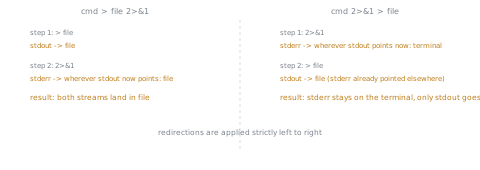
cmd > file 2>&1 and cmd 2>&1 > file look almost identical and do different things, because redirections are set up strictly in the order they're written. cmd > file 2>&1 first points 1 at file, then points 2 at wherever 1 now points (file), so both streams end up in file. cmd 2>&1 > file first points 2 at wherever 1 currently points (the terminal, if nothing redirected it yet), then points 1 at file, so 2 is already committed to the terminal and stays there while only 1 moves to file. Reading a redirection chain as "set this stream, then set the next one, based on where things stand right now" is the only way to predict the result correctly.
Custom file descriptors: opening one deliberately, without borrowing 0-2
exec 3< file opens file descriptor 3 for reading from file, in the current shell (not a subshell), leaving it open across subsequent commands until it's explicitly closed (exec 3<&-) or the script exits. This is the tool for reading from two sources at once without one interfering with the other, or for holding a file descriptor open for a lock (flock commonly uses one this way). It's a step beyond what most scripts need day to day, worth knowing exists once 0, 1, and 2 alone stop being enough.
Here-docs and here-strings: inline input without a separate file
<<EOF ... EOF (a here-doc) feeds everything between the two EOF markers to a command's standard input, as if it had been typed there; the closing marker has to start at the beginning of its line unless <<-EOF is used, which allows it to be indented to match the surrounding code. <<'EOF' ... EOF (the delimiter quoted) suppresses variable expansion and command substitution inside the block, useful for a literal template; leaving it unquoted expands $variables inside it normally. <<< (a here-string, bash-only) is the same idea for a single value already in hand: cmd <<< "$value" feeds $value plus a trailing newline to cmd's standard input, without needing a multi-line block at all.
Practice
- ▢ A script runs
backup.sh > /var/log/backup.log 2>&1. Where do the script's normal output and its error messages each end up?
Check
Both end up in /var/log/backup.log. > first points stdout at the log file; 2>&1 then points stderr at wherever stdout currently points, which is now that same file, so both streams are captured together.
- ▢ Rewrite
cmd 2>&1 > results.txtto send both stdout and stderr intoresults.txt, and explain why the original doesn't do that.
Hint
Consider what 2>&1 actually points at when it runs before anything has redirected stdout yet.
Check
The fix is cmd > results.txt 2>&1 (stdout redirected first, then stderr pointed at wherever stdout now points). The original doesn't work because 2>&1 runs first, pointing stderr at wherever stdout was pointing at that moment (the terminal), before > results.txt redirects stdout away; stderr is left on the terminal while only stdout moves to the file.
- ▢ What does
cat <<'EOF'(quoted delimiter) do differently fromcat <<EOF(unquoted) if the here-doc's body contains$HOME?
Check
With the quoted delimiter (<<'EOF'), $HOME is passed through literally, unexpanded. With the unquoted form (<<EOF), $HOME is expanded to its actual value before the text reaches the command, the same as any other double-quoted context.
- ▢ A script needs to feed a single already-known string, held in a variable, to a command's standard input, without writing a multi-line here-doc for it. What's the concise, bash-only way to do this?
Check
A here-string: cmd <<< "$value", which feeds $value (plus a trailing newline) directly to cmd's standard input in one line, no opening and closing delimiter needed.
-
▢ Which claim correctly explains why
cmd > file 2>&1andcmd 2>&1 > filebehave differently?- a)
2>&1always means "redirect stderr to the file named 1", regardless of where it appears - b) Redirections are applied strictly in the order written;
2>&1points file descriptor 2 at wherever file descriptor 1 currently points, so its effect depends on whether stdout was already redirected when it runs - c) The two forms are equivalent; bash reorders redirections before executing them
- d)
2>&1only has an effect when it appears before any other redirection
- a)
Check
b) That's the exact mechanism: 2>&1 redirects to wherever 1 points at that moment in the left-to-right sequence, not to a fixed target. (a) is false: 2>&1 means "point at wherever 1 points," never a literal file named 1. (c) is false: bash applies redirections in the written order, with no reordering. (d) is false: 2>&1 has an effect wherever it appears; that effect just depends on stdout's redirection state at that point.
Real-world reps
- [ ] Find a script you have access to that redirects both stdout and stderr, and check whether
2>&1comes after the file redirection (correct, for combining both into one file) or before it (likely a bug, unless leaving stderr on the terminal was the actual intent). - [ ] Find (or write) a script using a here-doc to generate a config file or template, and check whether its delimiter is quoted or not, and whether that matches what the template actually needs (literal
$characters versus expanded variables). - [ ] Tomorrow: read the primary source's section on redirection operators in full, including any form (like
>|to force overwrite undernoclobber) this lesson didn't cover.
Going further
- Docs: "Shell Command Language", POSIX.1-2017, The Open Group
- Docs: "Bash Reference Manual", GNU
- Resources
Not landing? Reread the primary source at the top, since this lesson compresses it and compression is where understanding leaks. Check the glossary for any term that felt slippery.
If the lesson itself is unclear rather than the material, that is a defect: open an issue.