Lesson 3. Basic Types and String Interpolation
Mission link: Both halves are foundations the rest of the arc assumes: the type keywords you will read in every signature, and the string syntax you will write in every log line and error message.
Primary source: Docs: "Built-in types (C# reference)", Microsoft Learn
Prerequisites: Lesson 2, Lesson 1
Warm-up
- ▢
int? a = 10;. What doa >= nullanda < nullevaluate to?
Check
Both false. For <, >, <= and >=, a null operand makes the result false in either direction, which is why the opposite of a false comparison is not automatically true once null is in play.
- ▢
int? n = 41; object o = n;. What doeso.GetType()report, and why?
Check
System.Int32. Assigning to object boxes the value, and boxing a nullable value type that has a value boxes the underlying type rather than the Nullable<T> wrapper, so there is nothing nullable left to report by the time GetType() runs.
- ▢ What does assigning one struct-typed variable to another do, compared with a class-typed one?
Check
The struct assignment copies the value and the two variables are then independent. The class assignment copies the reference, so both name the same object and a mutation through one is visible through the other.
Know this
The type keywords are aliases, not a separate tier of the language. int is System.Int32. The docs put it plainly: each C# type keyword is an alias for the corresponding .NET type and they are interchangeable, so double a = 12.3; and System.Double b = 12.3; declare variables of the same type (Built-in types).
This is the second place a Java instinct misfires, after lesson 1. In Java, int and Integer are genuinely two things: a primitive and a wrapper class, with autoboxing shuttling between them. In C# there is one type with two spellings, and the boxing you met in lesson 2 is a runtime operation applied to it, not a different type you converted into.
Two aliases worth memorising because the name does not match the keyword: float is System.Single, and decimal is System.Decimal. The rest follow the pattern you would guess (int to Int32, long to Int64, short to Int16, bool to Boolean, char to Char).
The three floating-point types, and the one you will actually argue about.
| Keyword | Precision | Size | .NET type |
|---|---|---|---|
float | ~6 to 9 digits | 4 bytes | System.Single |
double | ~15 to 17 digits | 8 bytes | System.Double |
decimal | 28 to 29 digits | 16 bytes | System.Decimal |
Each defaults to zero and each has MinValue and MaxValue. Note which types have the special constants: float and double provide not-a-number and the infinities, and decimal does not (Floating-point numeric types).
That table is the whole argument for money. A decimal carries 28 to 29 significant digits in 16 bytes and has no NaN or infinity to represent a computation that went wrong, which is what you want for an amount. And here is the Java contrast that matters for a service: Java's answer to the same problem is BigDecimal, a class you use through method calls, so a.add(b).multiply(c) is how arithmetic reads. C#'s answer is a built-in value type, so it is a + b * c with operators, no allocation per intermediate, and no wrapper to unwrap. If you arrived expecting decimal arithmetic to be verbose, that expectation is the habit to drop.
String interpolation, and the grammar of a hole. Prefix a string literal with $, with no white space between the $ and the quote. Every interpolation item has the same shape (String interpolation):
{<interpolationExpression>[,<width>][:<formatString>]}
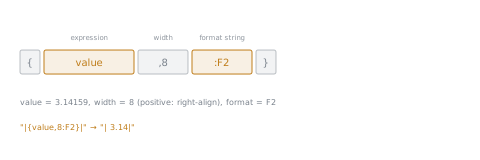
| Part | What it does |
|---|---|
interpolationExpression | The expression to format. When it evaluates to null, the output is the empty string |
,width | The minimum number of characters. Positive right-aligns, negative left-aligns |
:formatString | A format string the result's own type supports, such as F3 on a number |
Three consequences of that grammar. The colon is taken, so a conditional operator inside a hole has to be parenthesised: $"{name} is {age} year{(age == 1 ? "" : "s")} old.". A literal brace is doubled, {{ or }}. And an interpolated verbatim string takes both prefixes in either order, $@"..." and @$"..." are both valid.
Raw string literals interpolate too, with a rule worth reading twice: $"""...""" uses single braces for holes, and starting with more $ characters raises the number of braces a hole needs, so $$"""...""" delimits each hole with {{ and }} and leaves single braces as literal text. That is how you produce output containing braces, JSON being the obvious case, without escaping every one of them.
The rule that matters most is about what does not run. An interpolated string of type string is processed by an interpolated string handler, DefaultInterpolatedStringHandler, and the compiler typically turns it into a String.Format call, though it is free to do something better. The documentation attaches a warning to that: a handler might not evaluate all the interpolation expressions under all conditions, which means the side effects of those expressions might not occur.
So an interpolation hole is a place for a value, never for work. A counter you increment, a method that logs, a call that mutates something: put any of those in a hole and you have written code whose execution depends on how the string was consumed. This bites hardest with logging APIs, where an interpolated message may be discarded before it is ever built.
Practice
- ▢ Is
System.Int32 count = 5;different fromint count = 5;? Answer, then say what the equivalent question would be in Java.
Check
Not different at all: the keyword is an alias for the .NET type and the two are interchangeable, so both declarations produce a variable of the same type and the compiled output is identical. In Java the equivalent question has a real answer, because int is a primitive and Integer is a class, and choosing between them changes allocation, nullability and identity. C# collapses that distinction into one type, and the operation Java calls autoboxing is the boxing from lesson 2, which is something done to the value rather than a conversion to a different type.
- ▢ You are storing a monetary amount in a service. Choose between
doubleanddecimal, and defend it from the numbers rather than from habit.
Check
decimal. It carries 28 to 29 significant digits against double's ~15 to 17, in 16 bytes against 8, which is the trade being made: twice the storage for roughly twice the precision and a decimal rather than binary representation. The other half of the defence is what decimal deliberately lacks: float and double provide NaN and the infinities, so a bad computation can produce a value that propagates silently through every later total, while decimal has no such value to produce. For money that is a feature. And the arithmetic reads as arithmetic, total = price * quantity, because decimal is a built-in value type with operators rather than a class like Java's BigDecimal.
- ▢ Predict the output of
$"|{value,8:F2}|"whenvalueis3.14159, and of$"[{missing}]"whenmissingis null.
Hint
Take the hole apart into its three parts before evaluating any of them.
Check
| 3.14| and []. The hole is expression, then width, then format string: F2 formats to two decimal places giving 3.14, and the width of 8 pads the result to eight characters, right-aligned because the width is positive. A negative width, ,-8, would have left-aligned it instead. For the second, a null expression renders as the empty string rather than as the word null or a thrown exception, so the brackets close on nothing. That is worth connecting to lesson 2: interpolation is one of the few places where null quietly becomes something harmless.
- ▢ A developer writes
logger.LogDebug($"Loaded {LoadAndCount()} rows");whereLoadAndCount()both loads data and returns a count. Name what is wrong with it.
Check
The load may never happen. An interpolated string is processed by an interpolated string handler, and the documentation states that a handler might not evaluate all the interpolation expressions under all conditions, so the side effects of those expressions might not occur. A logging call that decides it will not emit this message is exactly such a condition. So the behaviour of the program now depends on the log level, which is the kind of bug that reproduces only in production. The fix is to do the work first and interpolate the result: call LoadAndCount() into a local, then log that. An interpolation hole is a place for a value, not for work.
-
▢ Which claim about
intandSystem.Int32is correct?- a) The int keyword is a distinct primitive, and System.Int32 is its wrapper class
- b) The int keyword is an alias for System.Int32, and the two are interchangeable
- c) The int keyword is compiled away, so System.Int32 appears only in metadata
- d) The int keyword names a value type, while System.Int32 names a reference type
Check
b) The docs state exactly that: each keyword is an alias for the corresponding .NET type and they are interchangeable. (a) is the Java model, where the primitive and the wrapper really are two types, and importing it here predicts differences that do not exist. (c) sounds sophisticated and says nothing: both spellings name the same type in source and in metadata. (d) invents a split that would contradict lesson 1, since System.Int32 is a value type under either spelling.
Real-world reps
- [ ] Find a monetary or quantity field in a C# codebase you can reach, or in a sample project. Check its type, and decide whether the choice survives the argument in practice item 2.
- [ ] Search for an interpolated string containing a method call. For each, decide whether that call does any work beyond producing a value.
- [ ] Tomorrow: write one interpolated string using all three parts of a hole, expression, width and format string, and run it. Then change the width's sign and confirm the alignment flips.
Going further
- Docs: "Built-in types (C# reference)", Microsoft Learn
- Docs: "String interpolation using $", Microsoft Learn
- Docs: "Floating-point numeric types (C# reference)", Microsoft Learn
- Resources
Not landing? Reread the primary source at the top, since this lesson compresses it and compression is where understanding leaks. Check the glossary for any term that felt slippery.
If the lesson itself is unclear rather than the material, that is a defect: open an issue.