Lesson 33. Declaring Dependencies
Mission link: Owning a service means owning what actually ships inside it and what actually compiles it, and both are decided by dependency coordinates, scopes and a resolution rule that most developers have never had to think about until it breaks something.
Primary source: Introduction to the Dependency Mechanism, Apache Maven
Prerequisites: Lesson 29, Lesson 13
Warm-up
- ▢ A generic method compiled once against
List<String>and once againstList<Integer>produces identical bytecode after erasure. What information is thrown away, and what does the compiler insert at each call site to compensate for its absence at runtime?
Check
Erasure discards the type argument. List<String> and List<Integer> both compile to plain List, and the compiler inserts a checked cast at the point where an element comes out, so a ClassCastException can still be thrown if something was smuggled in that does not match. The type system's job ends at compile time; nothing about String or Integer survives into the class file.
Know this
You declare a handful of dependencies in a POM and Maven resolves dozens of jars, at versions you did not type, using a rule that most developers describe backwards. This lesson is about reading that resolution and controlling it, not about avoiding it, because you cannot avoid it: every non-trivial project has a transitive graph whether you look at it or not.
Coordinates: what actually identifies a jar
A dependency is identified by groupId, artifactId and version, the same triple that names the artifact you build yourself. Three more parts exist for the cases where the triple is not enough:
packaging(calledtypeon the consuming side) says what kind of artifact this is:jarby default, orpomfor something that exists only to be imported or inherited, orwar, ortest-jarfor a jar built from another module'ssrc/test/java, used when one module's test helpers are worth reusing rather than duplicating.classifierdistinguishes two artifacts that share every other coordinate. The build most people have already seen without naming it is a "sources" or "javadoc" jar: samegroupId:artifactId:version, samejarpackaging, different classifier, different content.typeon a<dependency>element is how you ask for something other than a plain jar:<type>pom</type>to pull in a POM rather than code,<type>test-jar</type>to pull in another module's compiled tests.
Most dependencies never need the last three. They matter the day you need a BOM, a test-jar, or a native artifact published under a classifier, and at that point the fact that they exist is the only thing standing between you and a resolution error you cannot explain.
Scope: two questions, six answers
A scope answers two questions about one dependency: is it on the compile classpath, and is it on the runtime classpath. Six scopes, six combinations:
| Scope | Compile classpath | Runtime classpath | Typical use |
|---|---|---|---|
compile | yes | yes | the default; almost everything |
provided | yes | no | something the environment supplies at runtime, a servlet container's API, an annotation processor |
runtime | no | yes | a JDBC driver, a logging backend, code you call only through an interface you already have |
test | yes, for test sources only | yes, for test execution only | test frameworks and test-only helpers |
system | yes | no | a jar with no repository coordinates, resolved from an explicit <systemPath> instead; effectively deprecated, since installing the jar into a repository is almost always better |
import | not applicable | not applicable | valid only inside dependencyManagement on a <type>pom</type> entry; imports another POM's managed versions rather than adding a dependency |
test scope is worth taking literally rather than as a label. Declare junit-jupiter as test-scoped, the normal way, and try to import it from src/main/java:
package demo;

import org.junit.jupiter.api.Test;

public class Main {
    public static void main(String[] args) {
        System.out.println("ok");
    }
}
[ERROR] COMPILATION ERROR :
[ERROR] Main.java:[3,29] package org.junit.jupiter.api does not exist
That is mvn compile failing, not mvn test. The test-scoped artifact genuinely is not on the classpath that compiles src/main/java, and no amount of it being present in src/test/java fixes that. This is the single most common cause of "it compiles for me but not in the other module": a dependency that only ever needed to be test or provided was written into main code by accident, or it was fine in one module and someone moved the class into a module where the same dependency does not carry the same scope.
Transitivity: what carries to a consumer, and what does not
When your project depends on library A, you also get A's own dependencies, transitively, at whatever scope Maven decides they should have on your classpath. The rule that explains most "works here, missing there" bugs is this: provided and test scoped dependencies do not propagate to a consumer. A library's test dependencies are its own business. A library's provided dependency is something it expects its own runtime environment to supply, and that expectation does not inherit; your project has to supply it itself if it needs it.
Verified directly: lib-a declares commons-lang3 as test scope and jakarta.annotation-api as provided scope. consumer-b depends on lib-a with the default scope. Its full dependency tree:
[INFO] com.example:consumer-b:jar:1.0.0
[INFO] \- com.example:lib-a:jar:1.0.0:compile
Neither commons-lang3 nor jakarta.annotation-api appears anywhere in consumer-b's tree. Both were real dependencies of lib-a, resolved while building it, and both stop there. If consumer-b needs jakarta.annotation-api too, it has to say so itself. compile and runtime scoped dependencies do propagate, which is the reason a transitive graph exists at all.
Mediation: nearest definition wins, not newest
Ask what happens when two dependencies in the tree ask for different versions of the same library, and most people will say the newest version wins, assuming Maven tries to give you the best available code. It does not. Maven picks the version nearest to the root of the dependency tree, and if two candidates are equally near, the one declared first in the POM wins. Newness is not a factor at all.
Built and verified: a project directly depends on com.google.inject:guice:5.1.0 and com.google.cloud:google-cloud-core:2.30.0. Both pull in Guava, at different versions, through different paths:
[INFO] +- com.google.inject:guice:jar:5.1.0:compile
[INFO] |  \- com.google.guava:guava:jar:30.1-jre:compile
[INFO] \- com.google.cloud:google-cloud-core:jar:2.30.0:compile
[INFO]    +- (com.google.guava:guava:jar:32.1.3-jre:compile - omitted for conflict with 30.1-jre)
That second line, from mvn dependency:tree -Dverbose, is Maven telling you exactly what it discarded and why: guava 32.1.3-jre, newer than the version that won, was omitted for conflict. Both candidates sit one hop below a direct dependency, so depth alone does not separate them, and guice is declared first in the POM, so its Guava wins. The rest of the verbose output shows the same pattern: error_prone_annotations, j2objc-annotations and gson all resolve to whichever version came from the earlier-declared branch, sometimes older, sometimes newer, because age was never the criterion.
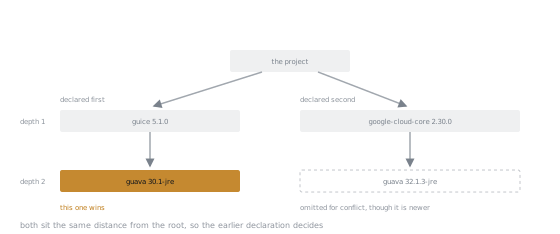
Both candidates are the same distance from the root, so nothing about the shape of the tree separates them. The version that wins is the older one, and the only thing that chose it was the order the two branches were written in.
Two ways to take control, both verified against the same conflict:
Declare the version directly. A dependency written in your own <dependencies> block sits at depth zero from the resolver's point of view, which beats anything transitive:
<dependency>
  <groupId>com.google.guava</groupId>
  <artifactId>guava</artifactId>
  <version>33.0.0-jre</version>
</dependency>
[INFO] \- com.google.guava:guava:jar:33.0.0-jre:compile
Or manage the version without adding a dependency. Put the same coordinate in dependencyManagement instead, with no matching entry in <dependencies>:
<dependencyManagement>
  <dependencies>
    <dependency>
      <groupId>com.google.guava</groupId>
      <artifactId>guava</artifactId>
      <version>33.0.0-jre</version>
    </dependency>
  </dependencies>
</dependencyManagement>
Guava is still pulled in only because guice needs it, but at the managed version:
[INFO] \- com.google.inject:guice:jar:5.1.0:compile
[INFO]    \- com.google.guava:guava:jar:33.0.0-jre:compile
dependencyManagement versus dependencies
<dependencies> adds a dependency to the build. <dependencyManagement> only sets a version, and optionally a scope or exclusions, for whichever module actually declares that dependency; it adds nothing by itself. That distinction is the whole reason dependencyManagement exists: in a multi-module project, a parent POM's dependencyManagement block is the one place every module's version of a shared library is decided, and each module's own <dependencies> block then names the library without a version at all. Change the version once, in the parent, and every module that declares the dependency picks it up. Without that separation, the same version string is copied into every module's POM, and upgrading it means finding every copy.
The BOM import
A BOM, bill of materials, is a <type>pom</type> artifact whose only content is a dependencyManagement block, published so other projects can import it wholesale instead of retyping its contents. Import it with <scope>import</scope> on a <type>pom</type> dependency inside your own dependencyManagement:
<dependencyManagement>
  <dependencies>
    <dependency>
      <groupId>org.junit</groupId>
      <artifactId>junit-bom</artifactId>
      <version>6.1.3</version>
      <type>pom</type>
      <scope>import</scope>
    </dependency>
  </dependencies>
</dependencyManagement>
<dependencies>
  <dependency>
    <groupId>org.junit.jupiter</groupId>
    <artifactId>junit-jupiter</artifactId>
    <scope>test</scope>
  </dependency>
</dependencies>
No version on junit-jupiter. Built and run against JDK 25: mvn test passes, and dependency:tree shows exactly what the BOM supplied:
[INFO] \- org.junit.jupiter:junit-jupiter:jar:6.1.3:test
[INFO]    +- org.junit.jupiter:junit-jupiter-api:jar:6.1.3:test
[INFO]    |  +- org.opentest4j:opentest4j:jar:1.3.0:test
[INFO]    |  +- org.junit.platform:junit-platform-commons:jar:6.1.3:test
[INFO]    |  +- org.apiguardian:apiguardian-api:jar:1.1.2:test
[INFO]    |  \- org.jspecify:jspecify:jar:1.0.0:test
[INFO]    +- org.junit.jupiter:junit-jupiter-params:jar:6.1.3:test
[INFO]    \- org.junit.jupiter:junit-jupiter-engine:jar:6.1.3:test
[INFO]       \- org.junit.platform:junit-platform-engine:jar:6.1.3:test
Every JUnit coordinate resolves to 6.1.3 without a single version string typed anywhere except the BOM import itself. That is the value: one imported BOM instead of five artifacts pinned by hand, each of which could quietly drift out of sync with the others if you pinned them separately.
<exclusions> and <optional>
Both say something to a different audience.
<exclusions> speaks to Maven, from inside the dependency that would otherwise bring something in: "resolve everything else about this dependency, but do not bring in this specific transitive artifact." Used when a transitive dependency is unwanted, superseded by something you declare directly, or conflicts with a licence or a security policy.
<dependency>
  <groupId>com.example</groupId>
  <artifactId>some-library</artifactId>
  <version>1.0.0</version>
  <exclusions>
    <exclusion>
      <groupId>commons-logging</groupId>
      <artifactId>commons-logging</artifactId>
    </exclusion>
  </exclusions>
</dependency>
<optional>true</optional> speaks to your own consumers: "this dependency covers one feature of mine, not all of them, so do not force it on whoever depends on me." It still resolves while your own project builds, but it does not propagate transitively the way a normal compile-scoped dependency would. A consumer who wants that feature declares the optional dependency for themselves.
Reproducibility: the same source, a different build
A version range like [3.14,) or a -SNAPSHOT dependency means the artifact resolved today is not guaranteed to be the artifact resolved tomorrow, from the same POM, with nothing else changed. That is a description of what actually happens: a range is re-evaluated against whatever is published at build time, and a SNAPSHOT is a mutable coordinate by design.
maven-enforcer-plugin 3.6.3 has rules for exactly this. banDynamicVersions, run against a dependency declared as [3.14,):
[ERROR] Rule 0: org.apache.maven.enforcer.rules.dependency.BanDynamicVersions failed with message:
[ERROR] Found 1 dependency with dynamic versions.
[ERROR] Dependency org.apache.commons:commons-lang3:jar:3.20.0 (compile) is referenced with a banned dynamic version [3.14,)
Note the resolved version in that message, 3.20.0: the range picked whatever was newest in the repository on the day the build ran, which is precisely the instability the rule exists to catch.
requireReleaseDeps catches SNAPSHOT dependencies the same way. Built and run against a project depending on an internal module still published as 1.0.0-SNAPSHOT:
[ERROR] Rule 0: org.apache.maven.enforcer.rules.dependency.BanDynamicVersions failed with message:
[ERROR] Found 1 dependency with dynamic versions.
[ERROR] Dependency com.example:internal-metrics:jar:1.0.0-SNAPSHOT (compile) is referenced with a banned dynamic version 1.0.0-SNAPSHOT
[ERROR] Rule 1: org.apache.maven.enforcer.rules.dependency.RequireReleaseDeps failed with message:
[ERROR] com.example:enforcer-demo:jar:1.0.0
[ERROR]    com.example:internal-metrics:jar:1.0.0-SNAPSHOT <--- is not a release dependency
Both rules fired on the same dependency: banDynamicVersions treats an unreleased SNAPSHOT as a dynamic version by default, and requireReleaseDeps names it directly as not a release. Either rule alone would have stopped this build from shipping something whose exact content is not pinned.
"Latest published" is not "latest stable"
A tool that offers to bump a plugin to its latest published version is not offering you the latest stable version, and for several widely used Maven plugins those are different artifacts. Checked live against Maven Central's own metadata:
| Artifact | Stable | Latest published |
|---|---|---|
maven-compiler-plugin | 3.15.0 | 4.0.0-beta-5 |
maven-surefire-plugin | 3.5.6 | 3.6.0-M1 |
maven-compiler-plugin is the sharpest case: the "latest" tag in Central's metadata for that plugin points at a 4.0.0 beta, not at any 3.x release. An automated upgrade, or an IDE quick-fix that reaches for "latest", will hand you a beta compiler plugin without saying so. Pin the version you actually tested against and treat every plugin upgrade as a decision, not a default.
Auditing the graph: dependency:tree and dependency:analyze
dependency:tree shows what is really there; dependency:analyze compares that against what your code actually imports, in two directions. Used, undeclared: a class your code imports resolves only because something else pulled the jar in transitively, and you never declared it yourself. Declared, unused: you declared a dependency and nothing in your compiled code references it.
Built deliberately: a project declares only commons-configuration2, which pulls in commons-lang3 transitively, and the code imports org.apache.commons.lang3.StringUtils directly without ever declaring commons-lang3:
[WARNING] Used undeclared dependencies found:
[WARNING]    org.apache.commons:commons-lang3:jar:3.14.0:compile
[WARNING] Unused declared dependencies found:
[WARNING]    org.apache.commons:commons-configuration2:jar:2.11.0:compile
The first warning is a bug waiting to happen: the day commons-configuration2's authors drop commons-lang3, or bump it past a version that removes the method you use, your build breaks for a reason that has nothing to do with anything you changed. Declaring commons-lang3 directly costs one line and converts a silent transitive assumption into an explicit, versioned decision that shows up in your own POM diff. The second warning is cheaper to ignore but still worth acting on: a declared dependency nothing uses is dead weight in every resolution and every upgrade.
One thing worth knowing before running dependency:analyze on a project built for a recent Java release: the default resolved plugin version can be too old to read the compiled class files. Analysing bytecode compiled for JDK 25 with an older maven-dependency-plugin fails with Unsupported class file major version 69; pinning maven-dependency-plugin 3.11.0 or later fixed it in this exact reproduction. Rechecked a release later on JDK 26, where the same reproduction gives Unsupported class file major version 70 from the same default plugin version, and 3.11.0 still reads the classes and still reports both directions correctly. So the number in that message names the release you compiled for rather than a bug somebody fixed, and the default the build resolves for you stays old while the class file version moves every six months. If a build tool refuses your own freshly compiled classes, suspect its own bytecode reader before suspecting the compiler.
Practice
- ▢ Predict what
mvn dependency:tree -Dverboseprints for a library pulled in by two direct dependencies at the same depth, when neither of those direct dependencies is declared with an explicit version override. Then say which version wins and on what basis.
Check
Depth alone will not separate two candidates at the same depth, so Maven falls back to declaration order in the POM: whichever direct dependency is written first wins its version of the shared library for the whole build, regardless of which version is newer. The output marks the loser with "omitted for conflict with" the version that won.
- ▢ Predict whether a
provided-scoped dependency in library A shows up on the classpath of an application that depends on A with the default scope.
Check
It does not. provided scope does not propagate to consumers. If the application also needs that dependency at runtime, it has to declare it itself, at whatever scope its own situation calls for.
- ▢ A teammate says: "we're getting
commons-lang3for free throughcommons-configuration2, so let's use it without declaring it ourselves." Predict whatdependency:analyzereports about this, and predict what happens the day the upstream library's own dependencies change.
Hint
One report is immediate and static; the other is a build failure that can arrive on any day, triggered by a change nobody on your team made.
Check
dependency:analyze reports commons-lang3 as a used, undeclared dependency right now. The day commons-configuration2 drops it, bumps it past a version that removed the method being used, or replaces it with something else entirely, the build breaks with no local change to explain why. Declaring it directly converts a silent assumption into an explicit dependency that shows up in your own diffs.
- ▢ Predict what
mvn compileprints when a class insrc/main/javaimports a type from a dependency declared with<scope>test</scope>.
Check
A compilation error naming the package as missing, for example "package org.junit.jupiter.api does not exist", because test scope puts the dependency on the test compile and test runtime classpaths only. mvn test would not even be reached; compile runs first and fails on its own.
- ▢ Predict what an enforcer rule set containing
banDynamicVersionsdoes with a dependency declared as1.0.0-SNAPSHOT, and whether addingrequireReleaseDepsalongside it changes anything.
Hint
Ask whether a SNAPSHOT counts as "dynamic" even though it looks like a fixed string.
Check
banDynamicVersions rejects it: by default a SNAPSHOT is treated as a dynamic version, since the artifact behind that coordinate can change between resolutions. requireReleaseDeps independently rejects the same dependency for a related but distinct reason, naming it as "not a release dependency". Both failures can appear in the same enforcer run, on the same coordinate, for two different rules.
- ▢ Predict which wins: a version declared directly in a module's own
<dependencies>, or the same library pulled in transitively one level deeper.
Check
The direct declaration wins. It sits at depth zero from the resolver's perspective, nearer than anything transitive, so it overrides the deeper version regardless of which one is newer. Only dependencyManagement in that same POM can compete with it, and if both are present, the explicit <dependencies> version still applies to that module.
Real-world reps
- [ ] Run
mvn dependency:tree -Dverboseon a project you maintain and find at least one line marked "omitted for conflict"; note the depth of each candidate before deciding whether the winner is the one you actually want. - [ ] Run
mvn dependency:analyzeon your main module and resolve every "used undeclared" line by declaring the dependency directly, at the version it actually resolved to. - [ ] Search your POMs for a version range or a
-SNAPSHOTdependency shipping outside a snapshot-only branch, and decide whether an enforcer rule should be blocking it. - [ ] Pick one transitive dependency your build currently relies on without declaring, and decide whether the risk of an upstream change is worth the one line it costs to declare it yourself.
- [ ] Tomorrow: run
mvn dependency:treeon the project in front of you and read the first ten lines end to end, noticing which scope each one carries.
Going further
- Maven POM Reference, Apache Maven: the authoritative field-by-field reference for
dependencyManagement,exclusionsandoptional - Enforcer Plugin: built-in rules, Apache Maven: the full rule catalogue, including
requireReleaseDepsandbanDynamicVersions dependency:analyze, Apache Maven: exactly what "used undeclared" and "unused declared" check, and what they do not- Testing and build: the reference sheet for this stage
- Resources
Not landing? Reread the primary source at the top, since this lesson compresses it and compression is where understanding leaks. Check the glossary for any term that felt slippery.
If the lesson itself is unclear rather than the material, that is a defect: open an issue.