Lesson 34. The Build Lifecycle
Mission link: Owning a Java service means someone else can run the exact sequence that produced last week's working artefact, a guarantee that comes from a phase and a goal binding, not a memorised command.
Primary source: Introduction to the Build Lifecycle, Apache Maven
Prerequisites: Lesson 33, Lesson 7
Warm-up
- ▢ Lesson 7 covered the single-file source launcher,
javac/java, andjshell. Once a program spans two files that reference each other, which of those three still works unmodified, and what has to change for the other two?
Check
The single-file source launcher stops working the moment there is a second file: java Scratch.java only compiles the one file named on the command line, so a reference to a class declared elsewhere fails to resolve. javac and java still work, but the invocation changes: javac now takes every source file, or a directory of them, and both tools need to agree on a classpath so that java ClassName can find every compiled class the program touches, not just the one whose main it runs. jshell is unaffected, since it was never doing file based compilation in the first place.
Know this
From a single file to something repeatable
Lesson 7's single-file launcher and its javac/java pair are exactly right for one file, or a handful compiled by hand into one classpath. They stop being right the moment the project has a dependency that needs fetching, or a separate tree of tests that compiles against the main code but never ships with it, precisely the shape Lesson 33 introduced. What that needs is not a smarter javac invocation, but a declared, repeatable sequence: compile these sources against these dependencies, compile those tests against this and the main output, run them, and produce an artefact, in that order, every time, on any machine with the same inputs. That sequence, written down once and executed by a tool rather than remembered by a person, is what a build tool is for. Maven is the one this arc uses, version 3.9 or later; comparing it against other build tools is out of scope, the point is what the build does, not why Maven does it rather than something else.
Phase versus goal, and the rule that explains everything
Maven separates two ideas that get blurred together the moment someone says "the build". A lifecycle is an ordered list of named phases: validate, compile, test, and so on, with no work attached to any by default. A goal is the actual work, a single unit of behaviour exposed by a plugin, such as the compiler plugin's compile goal or the surefire plugin's test goal. A binding connects the two, attaching a specific goal, from a specific plugin, to a specific phase. Nothing runs until something is bound, and a phase with nothing bound to it, which most of them are, simply passes through instantly.
The one rule that makes the rest of this lesson predictable: naming a phase on the command line runs every phase up to and including it, in lifecycle order, executing whatever is bound to each along the way. mvn compile does not skip straight to compiling; it runs validate first, then every earlier phase, then compile itself, and stops. mvn install runs the same phases, then keeps going through package, verify, and install. This is why mvn package always compiles first without anyone writing that down: compile comes earlier in the lifecycle than package, so asking for the later phase drags the earlier one along. With that model, "what will this command actually run" stops being answered from memory and becomes a question of finding the phase's position in the list.
Three lifecycles, not one
Maven ships three lifecycles, independent of each other, each with its own phase list: clean, default, and site. clean removes build output. default is the one that matters for almost everything here: it builds, tests, and ships. site generates project documentation and is out of scope. The phases of default a working Java project actually meets, in order, are validate, compile, test-compile, test, package, verify, install, deploy. The full lifecycle has more named phases than that, mostly ones nothing is bound to for an ordinary jar, such as process-resources between validate and compile, where resource filtering, covered below, actually happens. Naming the phase most invocations end at, package for a build only tested locally, install for one wanted by other projects on the same machine, deploy for one published outward, is nearly the entire vocabulary a day to day build needs.
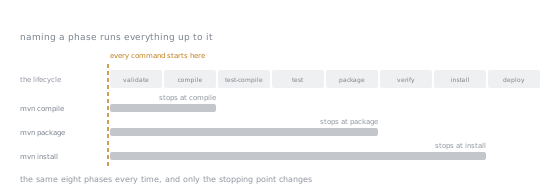
Three commands, one left edge. What a command runs is a prefix of the same list every time, so "what will this do" is answered by finding where its phase sits rather than by remembering.
Packaging decides what gets bound, and that is convention over configuration
<packaging>jar</packaging> in the POM is not decoration, it selects which default bindings apply. For jar packaging, Maven binds maven-jar-plugin's jar goal to the package phase automatically, which is the entire reason mvn package produces a jar in a POM that never mentions maven-jar-plugin at all. Running mvn help:effective-pom on a bare jar-packaged project confirms it: the plugin appears in the effective POM with an execution bound to package, though the project's own POM never declared it. Change <packaging> to pom, on a project with no modules and no plugins configured, and mvn package runs to BUILD SUCCESS printing no phase banners at all, because nothing is bound to anything for that packaging: no compiling, no testing, no packaging step, just an empty walk through the lifecycle. That is convention over configuration as a mechanism rather than a slogan: the packaging value is the lookup key into a table of default bindings, and changing the key changes what runs, with zero lines of build configuration touched.
The standard directory layout
A Maven project needs so little configuration partly because of that packaging based binding, partly because of a second convention: where files live. Main source goes in src/main/java, test source in src/test/java, non-code files shipped with the main output in src/main/resources, and everything the build produces, compiled classes, test reports, the final jar, in target/. Every plugin already knows these paths, so a project that follows them needs no <sourceDirectory> element at all; only one that deliberately deviates does.
Resources are more than a straight copy. A file under src/main/resources lands in target/classes unchanged by default, placeholders included, but declaring a <resource> with <filtering>true</filtering> makes Maven substitute POM properties into it during process-resources. Given app.version=${project.version} in a resource file, an unfiltered copy leaves that line exactly as written; filtering it against a project whose <version> is 1.0 turns it into app.version=1.0 in target/classes, verified by running the same build both ways. A placeholder that looks substituted in a teammate's build and inert in yours is almost always a missing <filtering>true</filtering>, not a typo in the placeholder.
Two lifecycles, one command, and why clean is not a phase of default
mvn clean test runs the clean lifecycle's one meaningful phase, deleting target/, then runs default up through test, inside a single Maven invocation. A real build log shows both happening in one run: the phase banners begin with clean:3.2.0:clean, then continue straight into resources:3.4.0:resources, compiler:3.15.0:compile, and onward, with no separate process in between. That is functionally identical to running mvn clean then mvn test as two commands, except for cost: one JVM start-up and one dependency resolution instead of two. clean is a separate lifecycle, not a phase inserted early into default, because deleting output is not itself a build step; folding it in would force every compile or test invocation to start from nothing, defeating incremental builds for the common case where nothing needs deleting. Keeping it a lifecycle named explicitly means asking for a clean build only when one is actually wanted.
Surefire and Failsafe: the asymmetry that matters
Unit tests run in the test phase, through the maven-surefire-plugin. Integration tests, conventionally named *IT rather than *Test, run through a second plugin, maven-failsafe-plugin, bound to the integration-test phase, with verify reserved for checking the result. Both plugins are pinned at 3.5.6 in this arc's baseline POM.
The asymmetry is the most useful surprise in this lesson. Surefire fails the build the moment a unit test fails, right there in test; a failing GreeterTest never lets the build reach package. Failsafe deliberately does not: a failing *IT test still lets mvn integration-test finish with BUILD SUCCESS, and only verify reports the failure and stops the build. Running the same failing integration test both ways shows it:
$ mvn integration-test
[ERROR] Tests run: 1, Failures: 1, Errors: 0, Skipped: 0, Time elapsed: 0.035 s <<< FAILURE! -- in l0034.GreeterIT
[ERROR]   GreeterIT.deliberatelyFails:9 expected: <Hello, Everyone> but was: <Hello, World>
[INFO] BUILD SUCCESS
$ mvn verify
[ERROR] Tests run: 1, Failures: 1, Errors: 0, Skipped: 0, Time elapsed: 0.031 s <<< FAILURE! -- in l0034.GreeterIT
[ERROR]   GreeterIT.deliberatelyFails:9 expected: <Hello, Everyone> but was: <Hello, World>
[INFO] BUILD FAILURE
[ERROR] Failed to execute goal org.apache.maven.plugins:maven-failsafe-plugin:3.5.6:verify (default) on project l0034: There are test failures.
The reason is post-integration-test, the phase between integration-test and verify: it tears down whatever the integration tests started, a database container, a server process, and needs to run whether they passed or not. If Failsafe failed the build immediately at integration-test, the way Surefire fails at test, that teardown would never run on a failing build, and whatever was left running would leak into the next one. Deferring the failure to verify guarantees cleanup happens first. A CI pipeline that stops at mvn integration-test and calls it green has silently disabled its own integration tests; the phase to run is always verify.
Inspecting instead of guessing
Two commands answer "what will actually run here" without trusting memory. mvn help:effective-pom prints the POM after every inherited default, plugin management entry, and property has been resolved into one document; searching it for a plugin's <executions> block shows the exact goal, phase, and version bound in this project. mvn help:describe -Dcmd=test takes a different angle, printing the whole lifecycle for the project's packaging with whatever is bound to each phase named alongside it.
Here is the trap in relying on describe alone. Run it against this lesson's project and it reports test: org.apache.maven.plugins:maven-surefire-plugin:3.5.4:test. The project's own POM pins Surefire at 3.5.6, and the real build log for the same project shows surefire:3.5.6:test actually running; effective-pom agrees, listing the default-test execution at version 3.5.6. The describe command's phase listing shows Maven's built-in default mapping for jar packaging, generic to whatever version ships with the running Maven distribution, not this project's overridden version. For a sanity check of the phase order, describe is fine; for "what is actually bound to test in this project", trust effective-pom or the build log's own phase banners instead.
The wrapper
Every command so far assumes whoever runs it has some particular Maven installed. mvn wrapper:wrapper, using maven-wrapper-plugin 3.3.4, removes that assumption: it generates mvnw and mvnw.cmd, launcher scripts for Unix-like shells and Windows, plus a .mvn/wrapper/maven-wrapper.properties file pinning an exact Maven version. The generated ./mvnw, run for the first time, downloads that pinned distribution into its own cache and uses it, regardless of what is already installed system wide, and every later build reuses the download. Verified directly: on a machine whose system-wide Maven was a different 3.9 release, generating the wrapper with -Dmaven=3.9.11 and running ./mvnw -v reports 3.9.11 instead, fetched into a cache entirely separate from the system installation, and ./mvnw clean package builds the jar exactly as mvn did. That is the whole point: the build no longer depends on what the person running it happens to have installed, beyond a JDK, which is why mvnw, mvnw.cmd, and the properties file are committed rather than left generated and ignored. A teammate, or a CI runner, clones the repository and runs ./mvnw, getting the pinned version with no separate installation step.
Offline builds, and what they tell you
mvn -o refuses to contact any remote repository, resolving every dependency and plugin purely from the local cache. On a project already built at least once, mvn -o clean package succeeds identically to a networked build, because everything it needs is already cached. Add one dependency never downloaded before and the same flag fails immediately and specifically:
[ERROR] Cannot access central (https://repo.maven.apache.org/maven2) in offline mode and the artifact com.google.guava:guava:jar:33.4.0-jre has not been downloaded from it before.
That failure is the useful part: it names the exact coordinate missing and the repository it would have come from, confirming where a build's inputs actually come from, a local cache filled in advance, not a fixed set of files inside the project. A CI environment that pre-warms that cache and builds offline gets a faster, more reproducible build; a cold cache with no network gets this error, naming precisely what to fetch first.
Reading a build failure
A failed build's log is long, but the useful line has a fixed shape: Failed to execute goal <plugin>:<version>:<goal> (<execution-id>) on project <artifact>, followed immediately by the reason. A syntax error in a source file, with mvn compile run against it, produces phase banners as usual up to the point of failure, then this:
[INFO] --- compiler:3.15.0:compile (default-compile) @ l0034 ---
[ERROR] COMPILATION ERROR :
[ERROR] /path/to/Greeter.java:[8,1] class, interface, enum, or record expected
[ERROR] Failed to execute goal org.apache.maven.plugins:maven-compiler-plugin:3.15.0:compile (default-compile) on project l0034: Compilation failure
That one line answers three things without reading anything else: which plugin ran, maven-compiler-plugin; which goal, compile; and, by matching the preceding [INFO] --- ... --- banner, which phase, here compile itself. The fastest way to find that line in a long log is to search backwards from the end for the first [ERROR] block, or grep the log for Failed to execute goal; everything after it just restates the same explanation with hints about -e and -X for more detail, not new information.
-DskipTests versus -Dmaven.test.skip=true
Both flags make mvn package finish without running tests, and they are not the same flag wearing two names. -DskipTests still compiles the test sources, only skipping execution, confirmed by finding GreeterTest.class and GreeterIT.class sitting in target/test-classes after a build run with it. -Dmaven.test.skip=true skips test-compile entirely, and target/test-classes does not exist afterwards at all. The difference matters when a build should still catch a test file that no longer compiles, even while skipping its execution: -DskipTests catches that, -Dmaven.test.skip=true does not, since it never looks at the test sources. Reaching for either flag habitually, rather than as a deliberate choice for one run, is a problem either way: it means not knowing whether the tests still pass, and with the second flag, not knowing whether they still compile either.
On Maven 4
Maven 4 exists, but only as a release candidate at the time of writing, not a stable release, so this lesson targets Maven 3.9.
Practice
- ▢ A project's
<packaging>ispom, it declares no plugins, and has no modules. Predict whatmvn packagedoes.
Hint
Ask what gets bound to any phase for that packaging value, not what the phase list contains.
Check
BUILD SUCCESS, with no phase banners at all. pom packaging has nothing bound to compile, test, or package by default, so the lifecycle runs from validate through package executing nothing, an instant success with an empty log where the jar-packaged version prints seven banners.
- ▢ You see
BUILD SUCCESSaftermvn integration-test, but a*ITtest failed. A teammate says the build is fine to ship. What is wrong with that conclusion, and which single-word change to the command fixes it?
Check
Failsafe never fails the build at integration-test on purpose, so BUILD SUCCESS there says nothing about whether the integration tests passed, only that Failsafe ran them and recorded the result for later. The fix is running verify instead: that is where Failsafe checks its recorded results and fails the build if any failed, after post-integration-test has had the chance to tear down whatever the tests started.
- ▢ Given a project that already built successfully once, predict the difference between
mvn -o clean packageand the same command with a brand new dependency added that has never been resolved on this machine.
Hint
-o does not change what needs resolving, only where Maven is allowed to look for it.
Check
The first succeeds exactly as a networked build would, since every artefact it needs is already in the local repository. The second fails immediately with Cannot access central ... in offline mode and the artifact ... has not been downloaded from it before, naming the missing coordinate. The flag never makes a dependency appear from nowhere, it only forbids the network call that would fetch it.
- ▢ You run
mvn package -DskipTestsand, separately,mvn package -Dmaven.test.skip=true. Both finish withBUILD SUCCESSand a jar. What is different insidetarget/, and why would a CI pipeline care?
Check
After -DskipTests, target/test-classes exists and holds compiled .class files for every test, since only execution was skipped, not compilation. After -Dmaven.test.skip=true, target/test-classes does not exist at all, since test-compile was skipped along with test. A pipeline that wants a fast build without running tests, but still wants to know no test file was left failing to compile, needs the first flag; the second gives up that guarantee entirely.
Real-world reps
- [ ] Run
mvn help:effective-pomon a project you maintain and find the exact plugin, version, and phase behind one goal you have always taken on faith. - [ ] Add a resource file with a
${project.version}placeholder, build it once without filtering enabled and once with, and compare what landed intarget/classesboth times. - [ ] Deliberately break a test in a project with both unit and integration tests, and confirm which single CI command would or would not have caught it.
- [ ] Generate a wrapper for a project that does not have one yet, and check the generated files into version control alongside the rest of the change.
- [ ] Tomorrow: run
mvn help:describe -Dcmd=testandmvn help:effective-pomon the same project, side by side, and note anywhere the two disagree.
Going further
- Introduction to the Standard Directory Layout, Apache Maven: the convention behind
src/main/java,src/test/java, and the rest, in full - The Maven POM Reference: every element a POM can declare, including the
<build>and plugin sections this lesson used - Maven Surefire Plugin: the unit test runner, its phase bindings, and its configuration options
- Maven Failsafe Plugin: the integration test runner and the
verifyphase behaviour this lesson relied on - Maven Wrapper Plugin: the
wrapper:wrappergoal and the files it generates - Testing and build: the reference sheet for this stage
- Resources
Not landing? Reread the primary source at the top, since this lesson compresses it and compression is where understanding leaks. Check the glossary for any term that felt slippery.
If the lesson itself is unclear rather than the material, that is a defect: open an issue.