Lesson 13. Set Operations, and One Question as One Query
Mission link: A question that reads as "rows in either list" or "rows in one but not the other" is a set operation, not a join, and writing it as a join either multiplies rows or misses the point. This is also the closing lesson of the stage, ending with the method for turning any of its questions into one query without trial and error.
Primary source: PostgreSQL, 7.4 Combining Queries
Prerequisites: Lesson 4, Lesson 11
Warm-up
- ▢ Lesson 4 established that
UNIONremoves duplicates across both sides andUNION ALLkeeps everything. What does that removal cost, and when does paying it buy nothing?
Check
Removing duplicates costs a sort or a hash of the whole combined result. It buys nothing when the two sides are already known to be disjoint, since there is no duplicate to find; UNION ALL is the right default in that case, and UNION only when a duplicate can genuinely occur.
Know this
The four operators, counted rather than recalled
Over orders, one query for amount > 100 and one for shipped_at IS NULL:
SELECT id FROM orders WHERE amount > 100
UNION
SELECT id FROM orders WHERE shipped_at IS NULL;
returns 8 rows. UNION ALL over the same pair returns 9, since order 110 satisfies both conditions and UNION keeps its one appearance where UNION ALL keeps both. INTERSECT returns 1 row, order 110 again, the answer to "which orders satisfy both". EXCEPT returns 4, the rows the first query has that the second does not.
Three of the four remove duplicates by default; only UNION ALL keeps a row as many times as it was produced, and INTERSECT ALL and EXCEPT ALL exist for the same reason. Lesson 4 already paid for what that removal costs, a sort or a hash of the result; INTERSECT and EXCEPT pay it too.
Columns match by position, not by name
SELECT id AS order_id, amount FROM orders WHERE id = 101
UNION
SELECT customer_id AS cust, amount FROM orders WHERE id = 104;
order_id | amount
---------+-------
2        | 200.00
101      | 120.00
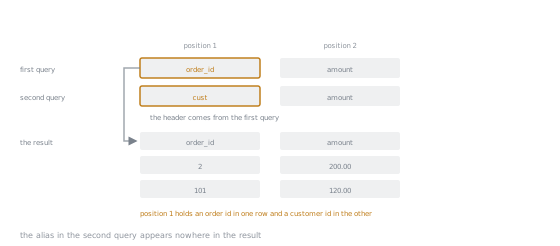
Both branches are drawn in the same two columns because position is the only thing pairing them. The names in position 1 disagree and it makes no difference to what gets combined.
The alias cust never appears; the header comes entirely from the first query, as lesson 4 stated. The match is purely positional: the first position holds an order's own id in one branch and a customer's id in the other, and UNION combines them without complaint because both are bigint. Swap which query is written first and the header swaps to cust.
Two errors a set operation refuses to paper over
A column count that does not match on both sides is rejected before any row is touched:
SELECT id, amount FROM orders WHERE id = 101
UNION
SELECT id FROM orders WHERE id = 104;
ERROR:  each UNION query must have the same number of columns
SQLSTATE: 42601
Write the same mismatch with INTERSECT and only the named operator in the message changes, same SQLSTATE 42601.
A column count that matches but a type that does not is a different class of error:
SELECT id FROM orders WHERE id = 101
UNION
SELECT email FROM customers WHERE id = 1;
ERROR:  UNION types bigint and text cannot be matched
SQLSTATE: 42804
bigint and text have no common type here, so PostgreSQL refuses rather than guessing at a conversion. The two errors differ in kind, shape against type, and the SQLSTATE tells them apart.
Ordering: before, after, and not stated at all
An ORDER BY cannot sit inside one branch of a set operation:
SELECT id FROM orders WHERE amount > 100 ORDER BY id
UNION
SELECT id FROM orders WHERE shipped_at IS NULL;
ERROR:  syntax error at or near "UNION"
SQLSTATE: 42601
A set operator combines two complete SELECTs, and lesson 2's ORDER BY is a single SELECT's last stage, so it cannot run before the combination it belongs after. Placed after the last branch instead, it orders the combined result:
SELECT id FROM orders WHERE amount > 100
UNION
SELECT id FROM orders WHERE shipped_at IS NULL
ORDER BY id;
returns the same 8 rows, now as 101, 103, 104, 105, 106, 108, 110, 112. A parenthesised branch may keep its own ORDER BY and LIMIT, since parentheses make it a complete statement evaluated before the combination runs:
(SELECT id FROM orders WHERE amount > 100 ORDER BY amount DESC LIMIT 2)
UNION
(SELECT id FROM orders WHERE shipped_at IS NULL ORDER BY id LIMIT 2);
returns 103, 105, 106, 112. The rule underneath: without a trailing ORDER BY, a set operation's result has no defined order. The plain UNION above, run with no ORDER BY at all, actually came back as 103, 104, 105, 106, 110, 101, 108, 112, matching neither branch's own order; PostgreSQL is free to deduplicate by a sort or a hash and hand back whatever order that leaves.
EXCEPT as a third way to write an anti-join, and what actually differs
SELECT id FROM customers
EXCEPT
SELECT customer_id FROM orders;
returns customer 6 alone, the identical single row lesson 8's LEFT JOIN ... IS NULL finds and lesson 11's NOT EXISTS finds. Three mechanisms, one answer here, which invites treating them as interchangeable styles, and the difference is not stylistic.
EXCEPT compares whole rows and deduplicates, both by nature. Comparing whole rows means it cannot return a column the second query lacks: id, email against a second query returning only customer_id fails with the identical shape-error above. LEFT JOIN ... IS NULL and NOT EXISTS carry no such restriction, since neither combines two result sets; both just filter rows of one FROM, so SELECT is free to name any column of that row.
Deduplication also lets EXCEPT change how many times a value appears, which a filter never does. Customer 4's orders carry 999.99, 10.00 and 10.00; taken EXCEPT an empty list of the same shape:
SELECT amount FROM orders WHERE customer_id = 4
EXCEPT
SELECT amount FROM orders WHERE customer_id = 999;
returns two rows, 10.00 and 999.99, not three: the second query removes nothing, yet the repeated 10.00 still collapses to one. EXCEPT ALL over the same pair returns all three, since ALL keeps a genuine duplicate genuine. Neither LEFT JOIN nor NOT EXISTS could drop one of the two 10.00 rows this way, since filtering never merges rows; only EXCEPT does, and that is what separates the three forms.
One question, one query: the method that closes the stage
The stage's promise was that a question becomes one correct query without guessing and rerunning. The method is an order of decisions, not a checklist of advice.
Before any of it, settle what shape of question you have, because the four steps below assume the answer needs columns from more than one table. If the second table is only being consulted to decide whether a row qualifies, that is a test rather than a join, and lesson 11's EXISTS or NOT EXISTS answers it without a row multiplying. If the answer is one list of rows stacked on or subtracted from another, it is a set operation, this lesson's material. Only when columns from both sides have to appear in the output is it a join question, and only then do the four steps apply.
First, decide which rows must exist and from which tables, fixing the FROM and, when a row matching nothing still has to survive, the join type: lessons 7 and 8. Second, decide what one row of the answer represents; if coarser than a row of the tables in FROM, something is grouped, and lesson 9 covers what a grouped column may be. Third, place each condition where it can still see what it needs, lesson 2's evaluation order doing the work: a row's own columns belong in WHERE; a condition on the group, usually an aggregate, can only live in HAVING, lesson 10's distinction. Last, decide what to output and in what order.
Take the question "which customers, including those who never ordered, spent under 100 in total, from least to most". Every customer must appear even with no orders, so the join is LEFT JOIN, lesson 8. One row of the answer is one customer, coarser than one row of orders, so the query groups by c.id, and lesson 9 already established that grouping by a primary key lets c.email ride along unaggregated. The condition is on a total, which does not exist until the group does, so it belongs in HAVING, not WHERE, lesson 10. A customer with no orders sums to NULL rather than 0, lesson 9's rule, and NULL < 100 is unknown, lesson 3's rule, so the total needs coalesce first. Last, the output: id, email, the total, ordered by it.
SELECT c.id, c.email, coalesce(sum(o.amount), 0) AS total
FROM customers c
LEFT JOIN orders o ON o.customer_id = c.id
GROUP BY c.id
HAVING coalesce(sum(o.amount), 0) < 100
ORDER BY total;
id | email               | total
---+---------------------+------
6  | barbara@example.com | 0
3  | alan@example.com    | 45.25
5  | edsger@example.com  | 60.00
Three customers, customer 6 among them at 0: the join decision in step one is the only reason it could still be in the running by step three.
Practice
-
▢ Predict the row count of the query below, and say in one sentence why it is larger than the plain
UNIONof the same two queries.SELECT id FROM orders WHERE amount > 100 UNION ALL SELECT id FROM orders WHERE shipped_at IS NULL;
Check
Nine rows: order 110 satisfies both conditions, so UNION keeps its one appearance while UNION ALL keeps both, one from each branch.
-
▢ Predict the exact error message and SQLSTATE of the query below.
SELECT id, amount FROM orders WHERE id = 101
INTERSECT
SELECT id FROM orders WHERE id = 104;
Hint
The rule this breaks is shared by all four operators; only the word naming the operator in the message changes.
Check
ERROR: each INTERSECT query must have the same number of columns, SQLSTATE 42601, the same rule UNION enforces, with INTERSECT named instead.
-
▢ Predict the SQLSTATE of moving
ORDER BY idfrom the end of the query below onto its first branch instead, beforeUNIONrather than after it.SELECT id FROM orders WHERE amount > 100 UNION SELECT id FROM orders WHERE shipped_at IS NULL ORDER BY id;
Check
42601, a syntax error at or near UNION, the token echoed back in the case you wrote it. An unparenthesised branch cannot carry its own ORDER BY; only the combined result, at the end, or a parenthesised branch can.
-
▢ The query below swaps which branch is written first, compared with this lesson's example. Predict the output's column header.
SELECT customer_id AS cust, amount FROM orders WHERE id = 104
UNION
SELECT id AS order_id, amount FROM orders WHERE id = 101;
Hint
The header follows the syntax, not what either column means.
Check
cust. The header comes from whichever query is written first, even though the second branch's order_id is arguably the more meaningful name.
-
▢ Predict the row count and values returned by the query below, and say how it differs from the same pair joined with
EXCEPTalone.SELECT amount FROM orders WHERE customer_id = 4 EXCEPT ALL SELECT amount FROM orders WHERE customer_id = 999;
Check
3 rows: 999.99, 10.00 and 10.00. customer_id = 999 matches nothing, so ALL keeps every left-hand row exactly as many times as it appeared, both 10.00s included. Plain EXCEPT returns 2 rows instead, 999.99 and 10.00 once, since it deduplicates its own output regardless of what the second query removed.
- ▢ In the closing example's query, predict what changes if
LEFT JOINis replaced with an ordinaryJOIN, everything else unchanged.
Check
2 rows, alan at 45.25 and edsger at 60.00; barbara, customer 6, disappears. An inner join never produces a row for a customer with no orders, so there is nothing left for GROUP BY to collapse into a zero total, whatever HAVING asks for afterwards.
Real-world reps
- [ ] Find a query at work that joins two tables to answer a "rows in either" or "rows in one but not the other" question, and check whether
UNIONorEXCEPTover two plainer queries answers it more directly, without a fan-out risk. - [ ] Take one report you maintain and apply this lesson's four-step method to it from scratch, noting any step where the existing query got the order wrong.
- [ ] Tomorrow: pick a business question not yet written as SQL, and produce one query for it using the method, without rerunning it to fix a mistake.
Going further
- 7.4 Combining Queries: the full grammar for
UNION,INTERSECT,EXCEPTand theirALLvariants, plus the parenthesised-branch rule - SELECT: the complete syntax reference, including where a set operator's
ORDER BYand column-matching rule are specified - Appendix A. PostgreSQL Error Codes: where SQLSTATE
42601and42804are catalogued - 7.5 Sorting Rows: why a result has no order until a trailing
ORDER BYasks for one - Querying: the stage 2 reference sheet
- Resources
Not landing? Reread the primary source at the top, since this lesson compresses it and compression is where understanding leaks. Check the glossary for any term that felt slippery.
If the lesson itself is unclear rather than the material, that is a defect: open an issue.