Lesson 43. Changing What Already Has Data
Mission link: A senior engineer is asked to add a rule to a table that has already broken it, or move rows into a new shape, without the application going down; treating either as one statement rather than a sequence of cheap and expensive steps is how a routine change becomes an incident.
Primary source: PostgreSQL, ALTER TABLE
Prerequisites: Lesson 24, Lesson 42
Warm-up
- ▢ Lesson 24 gave the three-step story for adding a
CHECKconstraint to a table that already has data: add itNOT VALID, which enforces the rule on new writes at once; then runVALIDATE CONSTRAINT, which scans the existing rows once. What does theNOT VALIDstatement itself never do to the rows already there?
Check
It never reads them. NOT VALID starts enforcing the rule against anything written from that moment on, but skips the scan that would check the rows already sitting in the table. That scan is exactly what VALIDATE CONSTRAINT does later, on its own.
Know this
A constraint on a table that already has data, priced as two statements
add constraint balance_nonneg check (balance >= 0) not valid succeeds at once, pg_constraint.convalidated reads f, and a violating insert is refused immediately, before anything is validated. validate constraint balance_nonneg then scans the table once and flips it to t. Holding each open and watching a second session showed why the split exists: not valid took AccessExclusiveLock, and an ordinary select count(*) blocked behind it until commit; validate constraint took ShareUpdateExclusiveLock instead, and an ordinary update went straight through while it ran. The statement that queues every reader and writer is also the fast, metadata-only one, so it fits in a deploy unnoticed; the one that walks the table and can take real time leaves reads and writes alone, so it runs separately, whenever suits.
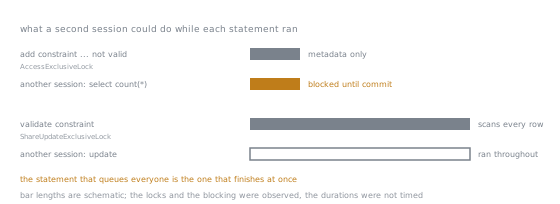
That is the inversion the split is built on, and it runs the opposite way to the intuition that a long statement is the dangerous one. Lock strength and duration are separate properties, and here they point in opposite directions: the bar that blocks a reader is the short one.
The same shape for a foreign key, with a lighter first lock
add constraint ... foreign key (customer_id) references customers_ref (id) not valid, then validate constraint, behave the same way: convalidated reads f, then t. The lock differs, and the documentation says why: "Although most forms of ADD table_constraint require an ACCESS EXCLUSIVE lock, ADD FOREIGN KEY requires only a SHARE ROW EXCLUSIVE lock." Holding the foreign key's NOT VALID open confirmed both halves: an ordinary select went through unblocked, but an insert into the referencing table blocked until commit. A lighter lock means fewer things wait, not nothing: SHARE ROW EXCLUSIVE still conflicts with an insert or update's lock, just not with a plain read the way ACCESS EXCLUSIVE does. VALIDATE CONSTRAINT again took the weaker ShareUpdateExclusiveLock, and an insert proceeded while it ran. Validation reads every row because the constraint promises something about every row, which cannot be taken on faith for rows that existed before the promise did.
SET NOT NULL on a column that already has rows
alter column email set not null, against a column genuinely holding a null, fails at once: ERROR: column "email" of relation "contacts" contains null values, SQLSTATE 23502. The way through reuses the shape above: backfill the nulls, add check (email is not null) not valid, validate it, then run set not null, which now succeeds. Release 12's notes are worth quoting rather than paraphrasing: "Allow ALTER TABLE ... SET NOT NULL to avoid unnecessary table scans", because "this can be optimized when the table's column constraints can be recognized as disallowing nulls." Once a validated constraint already proves no row is null, SET NOT NULL need not scan the table again to prove it. This is the one claim taken from the notes rather than a run: showing a scan was skipped needs a timing, and stage 6's rule is that a timing is not a portable count. The technique is verified; the saving is quoted, not measured.
The backfill, written as a loop rather than one statement
A single update widgets set status = 'new', touched = touched + 1 across two hundred thousand rows, run inside an open transaction, held a lock on every row touched until commit: a second session's update on one row from the middle of the table, nowhere near a boundary, blocked for the full duration, lesson 32's row lock. pg_stat_user_tables.n_dead_tup read 0 before and 200000 right after committing, one dead row version per row touched, all at once, lessons 29 and 41's dead versions. Making one row fail a CHECK partway through a similar update rolled the whole statement back: every row read its original value afterwards, lesson 28's atomicity. A batched version avoids all three by touching a bounded key range and committing after each one:
update widgets3
   set status = 'new', touched = touched + 1
 where id > 40000 and id <= 60000;
Half-open, contiguous ranges, each starting where the last left off, cover every row once: a ten-batch run of twenty thousand rows each left all two hundred thousand rows with touched equal to 1, none skipped or doubled. Three reasons follow. Locks last one batch's duration: the same blocking check against the batched version showed a row from an already-committed batch update immediately, while a row inside the open batch still blocked. Dead versions total the same, but arrive as smaller waves a vacuum clears between batches rather than one spike. If a batch fails, only that batch rolls back; the ones already committed keep their work.
Renaming, and why it takes two deploys
rename column full_name to display_name is instant and takes AccessExclusiveLock, confirmed the same way: held open, it blocked an ordinary select until commit, though the hold is normally momentary since renaming touches only a catalog entry. The real cost is not the lock: a rename in one step changes what every running instance must call the column at the same moment, and a deploy never replaces every instance at once. Querying the old name afterwards failed with ERROR: column "full_name" does not exist, SQLSTATE 42703, the error whichever half of a mixed deploy is behind would hit. The safe sequence uses a new column as the compatibility layer instead, the same shape this stage's community catalogue documents, a secondary source since it is a Ruby library's own documentation:
- Deploy 1 (database): add
display_name, backfill it fromfull_namewith the batched technique above, and add a trigger copying any write tofull_nameontodisplay_name, so undeployed code keeps writing the old column while the new one stays correct underneath. Lesson 42's version of this step has the application write both columns instead, and the choice between the two is about who you can change: a trigger needs no deploy and keeps working for code you do not control, and application dual-writes are easier to read and to remove, so reach for the trigger when clients are outside your release, and for dual-writes when they are not. - Application deploy: ship code reading and writing
display_nameonly. Not a schema change; deploy 1 already keeps both columns identical, so old and new code run side by side safely, and this step rolls back on its own. - Deploy 2 (database): once nothing touches
full_name, drop the sync trigger and the column.
Step 1 is reversible: dropping the trigger, its function and display_name again left full_name exactly as it was, verified directly. Step 3 is not: once full_name is gone, undoing it means re-adding it and repeating the backfill, not one statement.
The rollback question
Some steps reverse cleanly: dropping a NOT VALID constraint, or the compatibility column and trigger above, returns the table to what it was. A completed backfill or a finished rewrite of a column's meaning mostly does not: once the old shape is gone, no single statement recreates the earlier state, only a restore or the batches run in reverse where the transform allows it. The honest plan is forward-only steps, each safe to stop after, rather than one change promising to be undone as a unit. Judging whether a sequence has that property is lesson 45's subject.
Practice
- ▢ A
CHECKand a foreign key are each addedNOT VALIDin their own open, uncommitted transaction. A third session runs an ordinaryselectagainst each table. Predict which select blocks.
Check
Only the CHECK table's select blocks: plain NOT VALID takes AccessExclusiveLock, which conflicts with any lock. Adding a foreign key takes the weaker ShareRowExclusiveLock, which does not conflict with an ordinary read.
- ▢ A colleague says adding a foreign key
NOT VALID"won't block anything, reads go straight through." Say in one sentence what their check missed.
Hint
They tested a SELECT. What kind of statement takes the lock mode SHARE ROW EXCLUSIVE actually conflicts with?
Check
Reads go through, but writes do not: ShareRowExclusiveLock still conflicts with the lock an INSERT, UPDATE or DELETE takes, so any write queues until the constraint statement commits.
- ▢ A column holds three null rows. Predict what
SET NOT NULLdoes if run directly, without a backfill or a preceding validated constraint.
Check
It fails at once with SQLSTATE 23502, "contains null values". The column must be genuinely free of nulls, or already covered by a validated constraint that proves it, before SET NOT NULL succeeds.
- ▢ An
UPDATEtouching every row of a large table is still open in an uncommitted transaction. A second session updates one row from the middle of the table, nowhere near any boundary. Predict whether it blocks.
Hint
The open transaction did not stop partway through any row; what does it hold on every row it already wrote a new version for?
Check
It blocks. The open transaction holds a row lock on every row it touched, not only the ones near wherever it currently is, so any already-rewritten row stays locked until commit.
- ▢ A batched backfill of ten batches fails on batch eight. Say in one sentence how that differs from the same failure inside one single
UPDATEcovering all the rows.
Check
The first seven batches keep their committed work and only batch eight rolls back, whereas a single statement would have rolled all of it back, including the work equivalent to those seven.
- ▢ A rename adds a new column, backfills it, adds a trigger keeping it in sync, then later drops the old column once every instance is off it. Predict which step, adding the column and trigger or dropping the old column, is reversible, and why.
Check
Adding the column and trigger is reversible: dropping them again returns the table to its original shape, since the old column was never touched. Dropping the old column is not: undoing it means re-adding it and repeating the backfill, not one statement.
Real-world reps
- [ ] Find a column on a table you maintain that already holds rows, and write out the
NOT VALIDandVALIDATE CONSTRAINTpair you would run against it, without running either. - [ ] Look at a migration that renamed a column or table directly, in one step, and say whether a mid-deploy instance on the previous code would have broken against it.
- [ ] Tomorrow: take a job that updates many rows in one statement, and rewrite it as a batched loop over a keyed range, checking the ranges cannot skip or repeat a row.
Going further
- ADD table_constraint [ NOT VALID ]: the lock note quoted above about
CHECKversus foreign-key constraints - E.23. Release 12: the
SET NOT NULLscan-avoidance note, taken from the notes rather than a run - 53.13. pg_locks: the view used above to see which lock each statement took
- Renaming a column: the community catalogue's version of the same compatibility-column sequence, a secondary source since it documents a Ruby library
- Operating: the stage 7 reference sheet
- Resources
Not landing? Reread the primary source at the top, since this lesson compresses it and compression is where understanding leaks. Check the glossary for any term that felt slippery.
If the lesson itself is unclear rather than the material, that is a defect: open an issue.