Operating
Lookup sheet for stage 7. The question it exists to answer: what does this statement lock, does it rewrite or scan the table, and what is the safe way to run it instead?
The migration safety table
Every row is a statement a person actually runs against a table that already has traffic on it. "Rewrite" means every row is copied into a new file while the lock is held, checked against pg_relation_filenode before and after; a rewrite and a scan usually arrive together, but not always, since a scan can read every row to check a promise without copying any of them. The lock named is the one the statement actually took, checked against pg_locks for the statement's own backend, not assumed from the statement's name; several statements below hold a weaker lock than the "every ALTER TABLE takes ACCESS EXCLUSIVE" rule of thumb would predict. None of these locks are held any longer than the statement needs; how long that turns out to be, on a table with real traffic, is exactly what the review questions below exist to ask before the statement runs, not after.
| Operation | Lock | Rewrites | Scans | Safe alternative |
|---|---|---|---|---|
| Add a nullable column | AccessExclusiveLock, held briefly | No | No | None needed; this is already the harmless case |
| Add a column with a constant default | AccessExclusiveLock, held briefly | No | No | None needed; the default since release 11 is stored once in the catalog, not written into every row |
| Add a column with a volatile default | AccessExclusiveLock, held for the whole copy | Yes | Yes | Add it nullable first, backfill in batches, then set the default and NOT NULL in a later step |
| Drop a column | AccessExclusiveLock, held briefly | No | No | None needed for the drop itself; the column is only marked gone, not erased, so nothing to schedule around the statement, only around who still reads it |
Change a type, rewriting direction (int to bigint, bigint to numeric, any narrower-to-wider on-disk representation) | AccessExclusiveLock, held for the whole copy | Yes | Yes | Add a new column of the new type, backfill it in batches, switch reads across, drop the old column |
Change a type, non-rewriting direction (varchar(n) widened, varchar to text) | AccessExclusiveLock, held briefly | No | No | None needed; only the stored length check moves, not a byte of data |
| Rename a column or table | AccessExclusiveLock, held briefly, a catalog edit only | No | No | Not a lock problem: add the new name as a second column with a trigger keeping it in sync, move readers and writers across in a later deploy, drop the old name last |
Add an index, plain CREATE INDEX | ShareLock; blocks every write, not reads, for the build's duration | No (builds a separate structure) | Yes | CREATE INDEX CONCURRENTLY, run outside the migration framework's default transaction |
| Add a unique constraint | AccessExclusiveLock plus a ShareLock, held for the build; blocks reads and writes for the build's duration | No | Yes | CREATE UNIQUE INDEX CONCURRENTLY, then ADD CONSTRAINT ... UNIQUE USING INDEX, which attaches the already-built index under a brief AccessExclusiveLock with no scan |
| Add a check constraint, validated in one step | AccessExclusiveLock, held for the whole scan | No | Yes | ADD CONSTRAINT ... CHECK (...) NOT VALID, instant under the same lock, then VALIDATE CONSTRAINT under ShareUpdateExclusiveLock, which blocks nothing |
| Add a foreign key, validated in one step | ShareRowExclusiveLock, held for the whole scan; blocks writes on both tables, not reads | No | Yes | ADD CONSTRAINT ... FOREIGN KEY (...) REFERENCES ... NOT VALID, instant, then VALIDATE CONSTRAINT under ShareUpdateExclusiveLock, which blocks nothing |
SET NOT NULL directly | AccessExclusiveLock, held for the scan, and fails outright if any row is actually null | No | Yes, unless a validated CHECK already disallows null, a release-note optimisation not timed here | Backfill any nulls, add CHECK (col IS NOT NULL) NOT VALID, validate it, then SET NOT NULL |
A backfill (UPDATE touching many existing rows) | A row lock on every row touched, held until commit; the whole statement is one all-or-nothing unit | No (but stamps one dead row version per row touched, all at once) | Effectively yes | A loop over contiguous, half-open key ranges, each committed before the next starts |
The lock queue
- A plain read queues behind a waiting DDL statement, not behind whatever that statement is itself waiting for.
- One long-running transaction plus one ordinary
ALTER TABLEis enough to stop every later read on the table until the transaction commits, however cheap theALTER TABLEwould have been on its own. lock_timeout, set before the DDL statement, is the guard: the statement fails fast instead of joining the queue, and because it never took the lock, nothing ever queues behind it either.
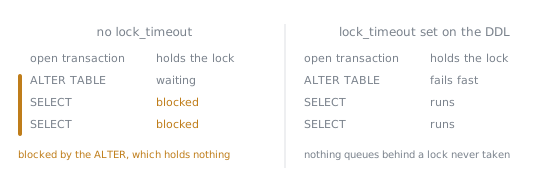
The third row is the one worth staring at. That SELECT is compatible with the open transaction and would have run beside it all day; what stops it is a statement holding no lock at all, only a place in the queue. This is why the outage looks nothing like its cause: the slow transaction is often long forgotten, the ALTER TABLE was expected to be instant, and the symptom is every read on the table hanging.
Expand, migrate, contract
- Expand (its own deploy): add the new column, index or constraint alongside the old shape, nullable or unvalidated so nothing already there has to be correct yet; the application starts writing to both.
- Backfill (not a deploy, a background batched job): bring every existing row up to date in the new shape.
- Migrate (its own deploy): the application switches its reads to the new shape; both are still written, so whichever deploy happens to be running gets a correct answer.
- Contract (its own deploy): remove the old column, trigger or constraint, once nothing reads or writes it any more.
No step ever depends on both the old and the new shape being correct at once, which is what makes it safe to run one deploy at a time against a fleet that never updates all at once.
The five review questions for a schema change
- What lock does each statement take, and for how long?
- Does anything rewrite the table or scan it?
- What happens while both the old and the new application code are running against it?
- What is the rollback, and is each step safe to stop after?
- What does this cost at the size the table will actually be?
See Lesson 45.
The review order for a query
- What rows does it return?
- What does it do to
NULLs and duplicates? - What does the plan say?
- What happens at a much larger table?
See Lesson 44.
The defects a query review looks for
| Defect | Lesson | The tell |
|---|---|---|
| Fan-out from a join condition that relates nothing to the row being counted | Lesson 9, applied in 44 | A total larger than the base table could ever produce, multiplied by exactly the number of extra matching rows on the far side |
A NULL inside a NOT IN subquery | Lesson 11, applied in 44 | A row that plainly qualifies is missing from the result entirely, recovered by NOT EXISTS |
| A predicate wrapped in a function with no matching expression index | Lesson 38, applied in 44 | Seq Scan with a Rows Removed by Filter close to the table's size, against a plain index on the bare column |
Deep OFFSET pagination | Lesson 40, applied in 44 | The buffer or row count scanned grows with the page depth for the same twenty rows returned |
| A planner estimate far from the actual, taken alone | Lesson 44 | A large gap at the node where estimate and actual part; worth asking about, but not itself proof the rows are wrong |
Portability
What travelled, rerun on SQLite 3.51 rather than assumed:
| Feature | Result |
|---|---|
| Window function with a frame | Ran; a bounded frame gave a different total from an unbounded one beside it |
->, ->>, json_extract | Ran; -> kept JSON quoting, the other two stripped it |
FULL JOIN, RIGHT JOIN | Ran, padding the unmatched side with NULL |
WITH RECURSIVE | Ran |
FILTER | Ran, counting only the filtered rows per group |
| Ordinary joins, aggregation, set operations | Ran without anything to remark on |
What did not, with the rewrite where one exists:
| Feature | On SQLite | Rewrite that travels |
|---|---|---|
GROUPING SETS, ROLLUP | Syntax error | One GROUP BY per grouping, UNIONed |
LATERAL | Syntax error | A window function, the row_number() top-N equivalence |
JSON_TABLE | Not a recognised function | None; SQLite's json_each is a different function |
DISTINCT ON | Syntax error | row_number() filtered to 1 |
UNIQUE NULLS NOT DISTINCT | Syntax error | A unique index on COALESCE(column, sentinel) |
| Domain | Not a recognised statement | The same CHECK written directly on every column that would have used it |
| Exclusion constraint | Syntax error | None that keeps the same guarantee; a trigger or an application lock approximates it |
| Materialised view | Not a recognised statement | An ordinary table plus CREATE TABLE ... AS SELECT, refreshed by rerunning it |
| Identity column | Not a recognised syntax | Nothing portable; INTEGER PRIMARY KEY on SQLite, each engine's own idiom elsewhere |
Multi-table DROP TABLE | Syntax error | One DROP TABLE statement per table |
The typing difference: a PostgreSQL numeric(12,2) is enforced on every write. SQLite has no type with a precision and a scale; it reads the word NUMERIC, applies numeric affinity, and lets 10.005 through unrounded, since there was never a scale to round to. A STRICT table narrows this but only for six base names, INT, INTEGER, REAL, TEXT, BLOB and ANY, and a NUMERIC(12,2) column fails at CREATE TABLE time inside one, since a precision and scale are not a shape it recognises at all.
ORM output
| Signature | Fix | What the fix costs |
|---|---|---|
| One query, then N near-identical queries, one per row of the first result (N+1) | Eager load the relationship: an IN-list load (selectinload or the equivalent) | Statement count fixed at two regardless of N; the IN-list grows with the page size |
| Same N+1, fixed by a join instead | Eager load with a join (joinedload or the equivalent) | Statement count fixed at one; the "one" side repeats once per match on the "many" side, so the application must deduplicate |
| Every column of every row loaded, then counted or measured in the application | count(*) run in the database | One integer returned instead of every column of every matching row |
| Sorting or filtering after loading every row into the application | ORDER BY or WHERE left in the query | Avoids transferring and discarding rows the database would have excluded or ordered anyway |
.limit().offset() pagination compiled straight through | Keyset pagination on the column already used to order | Removes the cost that grows with page depth; needs a unique tiebreaker in both WHERE and ORDER BY |
When the database is the wrong tool
- A work queue, several workers each claiming a different pending row: stays.
SELECT ... FOR UPDATE SKIP LOCKEDis already the mechanism it needs. - A hierarchy or graph walk, bounded and acyclic: stays, with a limit. A recursive
WITHdescends one round per level and stops once a round produces nothing new; a graph with many edges per node, or a search for one cheapest path rather than every reachable row, is a different problem the same query still answers, wrongly. - Document data of genuinely variable shape: stays, at a cost worth naming. Nothing enforces that a field inside it is the right kind of value, no key or
NOT NULLreaches inside it; move a field out to its own column once every row needs that enforced. - A stream read by many independent consumers, each at its own pace: leave.
SKIP LOCKEDremoves a claimed row from every other view, but a stream needs every consumer to see every event without one's progress deleting it for another, which means a read position per consumer and nothing deleted until the slowest has passed.
Diagnostics of the stage
| Error | SQLSTATE | Cause |
|---|---|---|
canceling statement due to lock timeout | 55P03 | lock_timeout expired while a DDL statement waited for a lock it never got |
CREATE INDEX CONCURRENTLY cannot run inside a transaction block | 25001 | CONCURRENTLY refuses a transaction wrapper, which a migration framework supplies by default |
| A uniqueness violation surfacing only at the end of a concurrent unique index build | 23505 | The build's second pass found a genuine duplicate; the index is left invalid, still occupying space and still maintained, until it is dropped |
column "..." of relation "..." contains null values | 23502 | SET NOT NULL run directly against a column that genuinely holds a null |
column "..." does not exist | 42703 | A query used a column's old name after a single-step RENAME COLUMN had already committed |
unknown datatype for t.price: "NUMERIC(12,2)" | Not applicable; a SQLite error, which has no SQLSTATE | A STRICT table's CREATE TABLE rejecting a precision-and-scale type it does not recognise |
cannot store TEXT value in INTEGER column | Not applicable; a SQLite error, which has no SQLSTATE | A STRICT table enforcing one of its six recognised base types against a mismatched insert |